

We have been talking about MCP (Model Context Protocol) for a few weeks now. Why it matters, how to prepare your docs for it, what it changes about who reads your help center.
This post is the practical version of the same question. What can your team actually do with HelpSite MCP Server now that it is here?
Five workflows below. Each one is something the people on your support, ops, content, and product teams can start doing from inside whichever MCP-compatible AI client they already use.
What HelpSite MCP Server actually does
A short refresher. HelpSite MCP Server lets your team connect their HelpSite knowledge base to any MCP-compatible AI client (Claude Desktop, Claude Code, and more as the ecosystem grows). The AI client gets a clean, structured connection to your live help center. It can search, read, draft, update, and organize HelpSite content through API-backed tools.
The practical outcome: a lot of the work that used to mean clicking around the HelpSite UI can now happen through your AI client of choice, while your help center stays the single source of truth.
Here are the five workflows that will move the needle fastest.
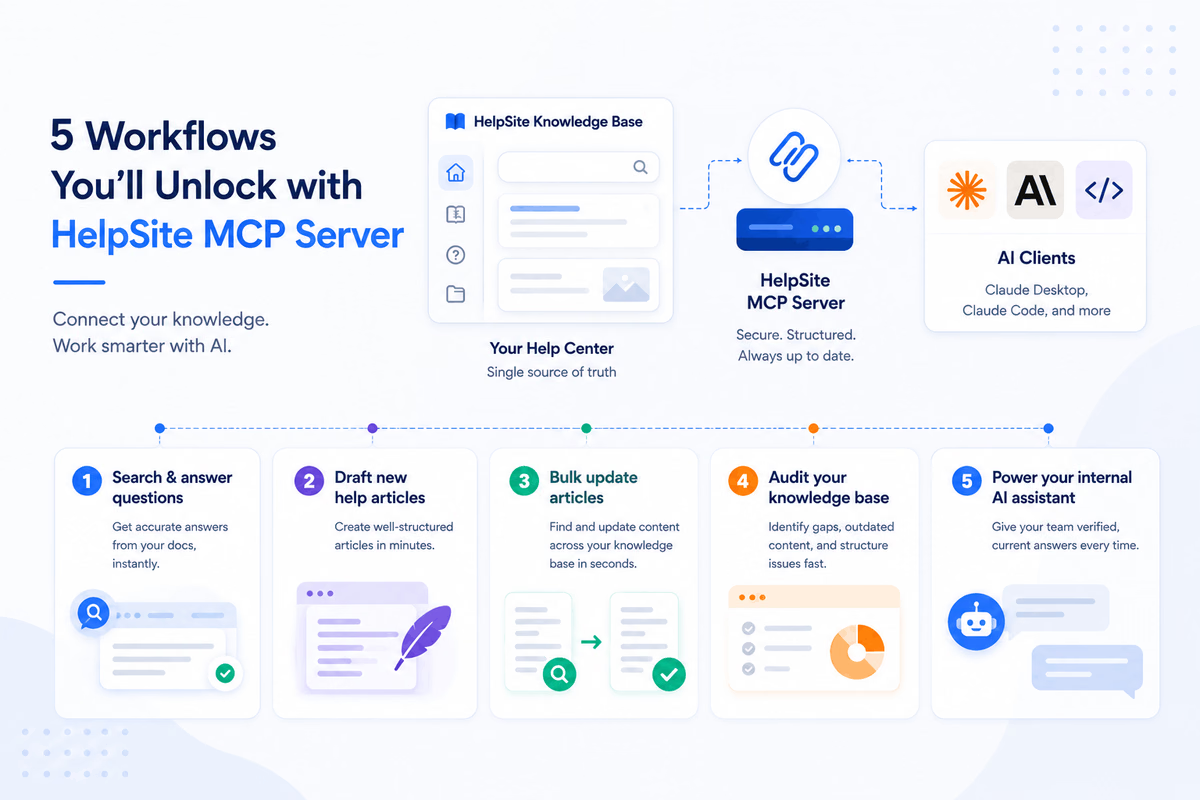
Workflow 1: Search and answer customer questions from inside Claude
Today, when a support agent gets an unfamiliar ticket, they open a tab, type a search into the help center, scan results, click the most likely article, and skim. Three context switches before they have an answer.
With HelpSite MCP Server, the agent asks Claude the customer's question directly. Claude queries the live HelpSite knowledge base, finds the right article, and surfaces the answer with the source link. The agent verifies and replies. One step instead of four.
The same workflow runs for any team member fielding a question they do not have memorized. Sales reps on a discovery call. CSMs in a QBR. Founders answering an inbound question on LinkedIn.
Workflow 2: Draft new help articles without leaving your AI client
A support agent answers a question that does not have a doc yet. Today they either flag it for someone else (and the doc never gets written) or open the HelpSite UI and write it themselves (and the queue gets behind).
With HelpSite MCP Server, the agent tells Claude "draft a help article on how to reset your team workspace password," reviews the draft in chat, and saves it to HelpSite without ever leaving the AI client. The article publishes structured (question-led title, lead-with-the-answer first paragraph) because Claude follows the patterns the platform rewards. Our AI Help Center Guide covers why that structure matters.
What an amazing platform. It has helped me a lot. I created it for my organization and my seniors, and everyone is so happy after seeing this amazing tool. One stop solution for any organization. We can create an SOP with this and put everything in one place.
Vivek K., Immigration Consultants, International Trade and Development
Workflow 3: Bulk update articles when the product changes
Product team ships a rename. The setting that used to be called "API Token" is now called "Personal Access Token." Today, someone in support has to find every article that references the old name, edit each one, and republish. Hours of work, easy to miss articles.
With HelpSite MCP Server, the change becomes a short prompt: "find every article that mentions 'API Token' and update the references to 'Personal Access Token' where the new name applies." Claude searches HelpSite, surfaces the matches, applies the updates, and shows you what changed for review. What used to take half a day takes ten minutes.
The same workflow handles screenshot refreshes, pricing changes, integration partner renames, and policy updates. Anything that touches multiple articles.
Workflow 4: Audit your knowledge base structure with AI
The 30-minute knowledge base audit from our audit playbook just got faster.
With HelpSite MCP Server, you can ask Claude to "review my help center for orphan articles, stale references, and missing categories" and get a structured list back. Same with "find duplicate articles answering 'how do I cancel my plan'" or "list articles that have not been updated in 12 months and are still getting traffic." The judgment calls (archive, rewrite, leave alone) stay with you. The grunt work of pulling the lists moves to Claude.
This is the workflow that closes the gap between "we should audit" and "we actually audit." Lower the cost of starting, the work happens.
Workflow 5: Power your internal team's AI assistant with verified, current content
If your team uses Claude, Claude Desktop, or any internal AI assistant, the answers it gives are only as good as the sources it can read. Today, those sources are usually a stale snapshot of your docs or whatever was in the training data.
With HelpSite MCP Server connected, your internal AI assistant pulls answers from your live help center every time. New hires onboard against current content. Sales engineers answer technical questions with the same answer the customer would see in the help center. Support agents get the canonical answer rather than the one they vaguely remember from last quarter.
This is also the foundation for embedded chatbots that stay accurate as your product evolves. We covered the underlying mechanism in our knowledge base AI chatbots post.
Very intuitive to use. New team members can easily learn the ropes. We didn't need a full ticketing software or customer service platform, just an FAQ page. The price was right and the features were not bloated like other products we explored.
Rachel M., Owner, Media Production
What the rollout will look like
HelpSite MCP Server setup is straightforward: connect HelpSite to your AI client of choice, choose which articles to expose (the public vs internal distinction in your existing HelpSite setup carries over), and you are running.
If you want better results from MCP Server, the structural work still pays off. Question-led titles, lead-with-the-answer paragraphs, defined product terms, clean metadata. The same patterns that make content AI-readable today make it easier for MCP-connected tools to use well.
For SaaS, IT, and support teams thinking about how their docs will feed an MCP-connected AI stack, the structural prep work compounds across every channel your help center touches.
Frequently asked questions
Do we need to be on a specific HelpSite plan to use MCP Server?
Check the current HelpSite pricing page for plan details. The structural prep work (question-led titles, clean metadata, defined terms) applies regardless of plan.
Which AI clients does HelpSite MCP Server work with?
HelpSite MCP Server is designed for MCP-compatible clients, including tools such as Claude Desktop and Claude Code, with more clients adopting MCP across the ecosystem.
Will MCP Server work with our internal SOPs as well as customer-facing docs?
Yes. HelpSite MCP Server respects the public versus internal article distinction in your existing setup. Internal SOPs stay private to authorized users. Public articles are surfaced to the AI client based on the access scope you set.
Do we still need to maintain our help center if MCP is doing the work?
Yes. MCP makes your help center accessible to AI tools. It does not write your help center. The structural work in our knowledge base audit guide still applies.
How do we start using HelpSite MCP Server?
Start with a free trial, then check the current HelpSite pricing page for plan details. Before connecting your AI client, clean up article titles, categories, and access settings so MCP has useful content to work with.
Final thoughts
The teams who get the most out of HelpSite MCP Server will be the ones who walked in with structured, current docs already in place.
Pick one workflow above. Imagine your team running it this week. That picture is the bar your docs need to clear for MCP to be genuinely useful. The work you do this month compounds every time an AI client asks your knowledge base for help.