

Launching an AI chatbot sounds easy—until the first customer asks a real question.
Support managers often discover the same problem: the chatbot answers confidently, but incorrectly. It pulls from generic internet knowledge instead of your company’s actual documentation. The result? Confused customers, more tickets, and less trust in the AI.
This is why teams that succeed with AI support focus on documentation first. When you train AI chatbots with company knowledge, the foundation isn’t prompts or plugins—it’s a structured knowledge base that organizes product guides, FAQs, and workflows so AI can retrieve accurate answers.
Let’s break down how this works and how support teams can turn their help center into a reliable source of AI chatbot training data.
Why AI chatbots fail without company knowledge
Most AI chatbots start with large language models trained on general internet content. These models are impressive—but they don’t know the specifics of your product, policies, or workflows.
Without structured company documentation, chatbots rely on guesswork.
Typical problems include:
- Incorrect product instructions
- Outdated onboarding steps
- Fabricated answers that sound believable but are wrong
This happens because the chatbot lacks company knowledge AI chatbot systems need to answer correctly.
Micro-case: the onboarding mistake
A SaaS startup launches an AI support chatbot during beta.
Customers begin asking questions like:
“Where do I upload my CSV file?”
The chatbot responds with instructions referencing an old UI layout. The product team had redesigned onboarding two months earlier—but the chatbot wasn’t connected to the updated documentation.
The result: dozens of confused users and a spike in support tickets.
How knowledge bases help train AI chatbots with company knowledge
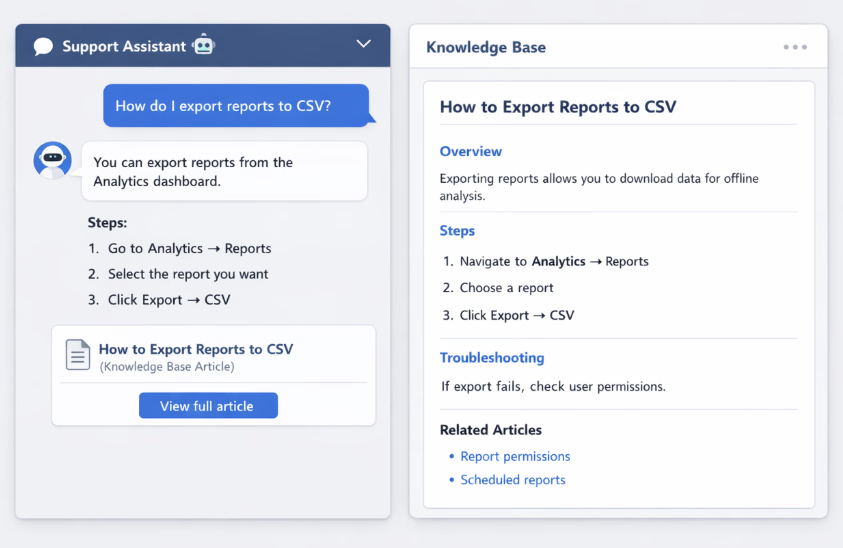
The most effective AI support systems rely on documentation retrieval, not pure AI generation.
Instead of inventing answers, the chatbot searches your knowledge base for relevant content and then summarizes the result.
This approach ensures responses stay grounded in real company documentation.
How the process works
A typical AI support flow looks like this:
- Problem explanation
- Step-by-step solution
- Troubleshooting section
- Related links
This approach—often called retrieval-augmented generation (RAG)—allows AI systems to search external knowledge sources such as documentation before generating an answer, which significantly improves accuracy and reduces hallucinations
What makes a good AI chatbot knowledge base
Not every help center works well as an AI chatbot knowledge base. Documentation needs structure so AI can locate the right information.
Support teams should focus on three key areas.
Clear article structure
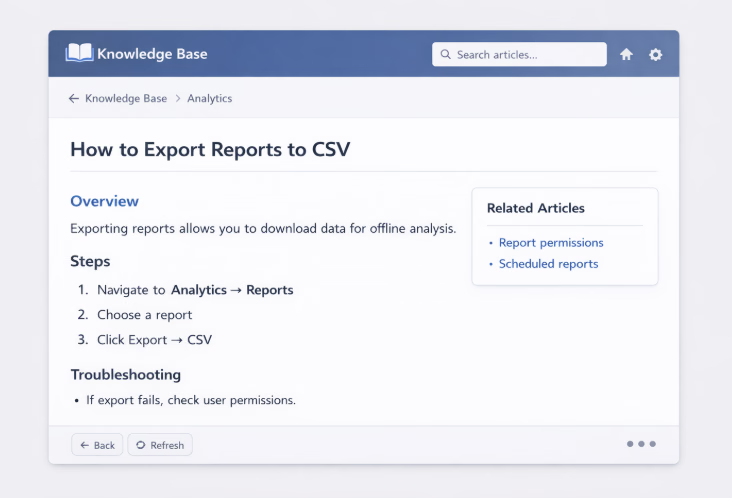
AI works best when articles follow predictable formatting:
This structure improves both human readability and AI retrieval accuracy.
Consistent terminology
Many companies accidentally create documentation confusion.
Example:
- “Dashboard reports”
- “Analytics reports”
- “Insights exports”
If documentation uses different terms for the same feature, AI search may miss relevant articles.
Standardizing terminology across documentation makes AI answers more reliable.
Searchable article titles
Titles should match how customers ask questions.
- Bad title: “Reporting module configuration”
- Better title (bold): “How to export reports to CSV”
This approach improves both knowledge base search and AI retrieval quality.
Building AI chatbot training data from documentation
Support teams often ask:
How do we create AI chatbot training data from documentation?
The answer is simpler than many expect.
Your knowledge base already contains the best training data—you just need to structure it correctly.
Step 1: Turn support tickets into articles
Support tickets reveal what customers actually ask.
Common questions should become help articles.
Example workflow:
- Customer submits ticket
- Support agent solves issue
- Solution becomes a help article
- AI chatbot references that article
Over time, this builds a powerful dataset for AI.
Micro-case: reducing repeated tickets
Lisa J. from Capterra made a review:
We rebuilt our help system using HelpSite in just a few days. Our support calls dropped by about 30% in the first year.
When those articles become AI training data, the impact compounds.
Step 2: Break documentation into clear sections
AI models work better with short, focused sections.
Avoid long pages covering multiple topics.
Instead, use headings like:
- Overview
- Steps
- Troubleshooting
- Related questions
Step 3: Maintain documentation continuously
AI chatbots only know what the knowledge base contains.
If documentation becomes outdated, the chatbot will repeat outdated instructions.
This is why modern support teams treat documentation as a living system.
Why a structured knowledge base improves AI accuracy
When companies implement AI support without structured documentation, hallucinations increase.
With a strong knowledge base, answers improve dramatically.
Three benefits of documentation-driven AI
1. Accurate answers
AI pulls from verified documentation rather than guessing.
2. Consistent support responses
Customers, agents, and chatbots reference the same knowledge base.
3. Faster onboarding for new agents
Agents use the same documentation that trains the chatbot.
Micro-case: multi-team documentation
- Bradley U., Chief Content Creator shared on Capterra that using HelpSite built both internal and external knowledge bases so employees and customers could access the same product documentation. Teams reported the platform made it easy for non-technical staff to publish and maintain articles.
This shared knowledge improves both human support and AI responses.
Designing a knowledge base for AI chatbots
If you want a knowledge base for AI chatbots, a few design principles make a big difference.
Organize documentation into clear categories
Typical categories include:
- Getting started
- Account management
- Troubleshooting
- Integrations
- Billing
Clear categories improve search performance for both humans and AI systems.
Use short paragraphs and bullet points
Large blocks of text are harder for AI to summarize.
Use:
- Numbered steps
- Bullet lists
- Short paragraphs
This improves answer extraction and readability.
Link related articles
Internal links help AI systems retrieve related information when a question touches multiple topics.
Example:
How to export reports to CSV
might link to:
- Report permissions
- Scheduled reports
- Download formats
These connections help AI deliver more complete answers.
If your team answers the same support question every week, it’s a sign that information is trapped in emails, Slack messages, or scattered docs.
A simple knowledge base lets customers or patients find clear instructions instantly—without waiting for a reply.
How support teams deploy AI chatbots using a knowledge base
Most modern AI chatbots connect directly to documentation platforms.
Typical implementation looks like this:
Step 1: Publish documentation in a knowledge base
Teams organize product knowledge into structured help articles.
Platforms like HelpSite allow teams to publish documentation quickly without engineering help.
Step 2: Connect the chatbot to the knowledge base
AI tools index the documentation and create a searchable dataset.
When customers ask questions, the chatbot retrieves the most relevant articles.
Step 3: Monitor chatbot answers
Support teams review chatbot responses and identify gaps.
If AI struggles with certain questions, new articles are added to the knowledge base.
This creates a continuous improvement loop.
The SEO bonus of documentation-driven AI
A well-structured help center doesn’t just train AI chatbots—it also attracts search traffic.
Public knowledge bases often rank for long-tail questions such as:
- “How to export reports to CSV”
- “Slack integration troubleshooting”
- “Reset two-factor authentication”
According to HelpSite’s content strategy roadmap, AI knowledge base topics represent a growing long-tail SEO opportunity, making them strong candidates for documentation-driven content marketing.
This means your documentation can serve three roles:
- Customer self-service
- AI chatbot training data
- Organic search acquisition
Signs your company is ready for AI chatbot support
Not every organization should deploy AI immediately.
But if these conditions exist, you’re likely ready.
You already have a help center
Even a small documentation library can train an AI chatbot.
Your support team sees repeat questions
If agents answer the same questions daily, those answers belong in documentation.
AI chatbots excel at handling repetitive inquiries.
Your documentation is searchable
Fast search and structured articles help AI retrieve the right content quickly.
Many teams prioritize knowledge base platforms with strong search performance for this reason.
Final thoughts: train AI chatbots with company knowledge
AI chatbots are transforming customer support—but their effectiveness depends on the quality of your documentation.
The most successful teams don’t treat documentation as an afterthought. They treat it as the foundation of AI support.
When you train AI chatbots with company knowledge, the knowledge base becomes the system that powers every answer.
It enables AI to retrieve accurate information, reduces support tickets, and ensures customers receive consistent help.
In other words, great AI support starts with great documentation.