

A help center that feels like a generic third-party portal undermines every answer in it. Customers can tell when a support page is glued on. Buyers notice. AI assistants reading your docs cite you less clearly when your brand is missing.
HelpSite Themes are now live. You can start from a polished, ready-made theme, add your logo, set your colors and fonts, and connect your own domain. If your brand needs more, you can edit the HTML and CSS underneath. The result is a help center that feels like part of your product instead of bolted on.
This release sits alongside two other recent launches: HelpSite AI Chatbot and HelpSite MCP Server. Together they form a polished, AI-ready, on-brand support layer your customers actually trust.
Why branded help centers matter more in 2026
Branding is no longer just a customer experience issue. It is a buying signal, an AI signal, and a trust signal at the same time.
Buyers notice. B2B prospects research your help center before they ever book a demo. A neglected, off-brand support page reads as "this team takes shortcuts." A polished, branded one reads as "this team operates well."
AI assistants notice. When AI tools cite your docs, they cite the URL and the visual context. A help center on your own domain with your brand visible is more credible than a third-party subdomain.
Customers notice. Every handoff from your product to your help center is a moment of potential trust loss. When the visual language matches, the handoff is seamless. When it does not, customers question whether they are still inside your product.
What is in the Themes release
Four ready-made layouts, editable default styling, full no-code controls, and full HTML and CSS access when you want it.
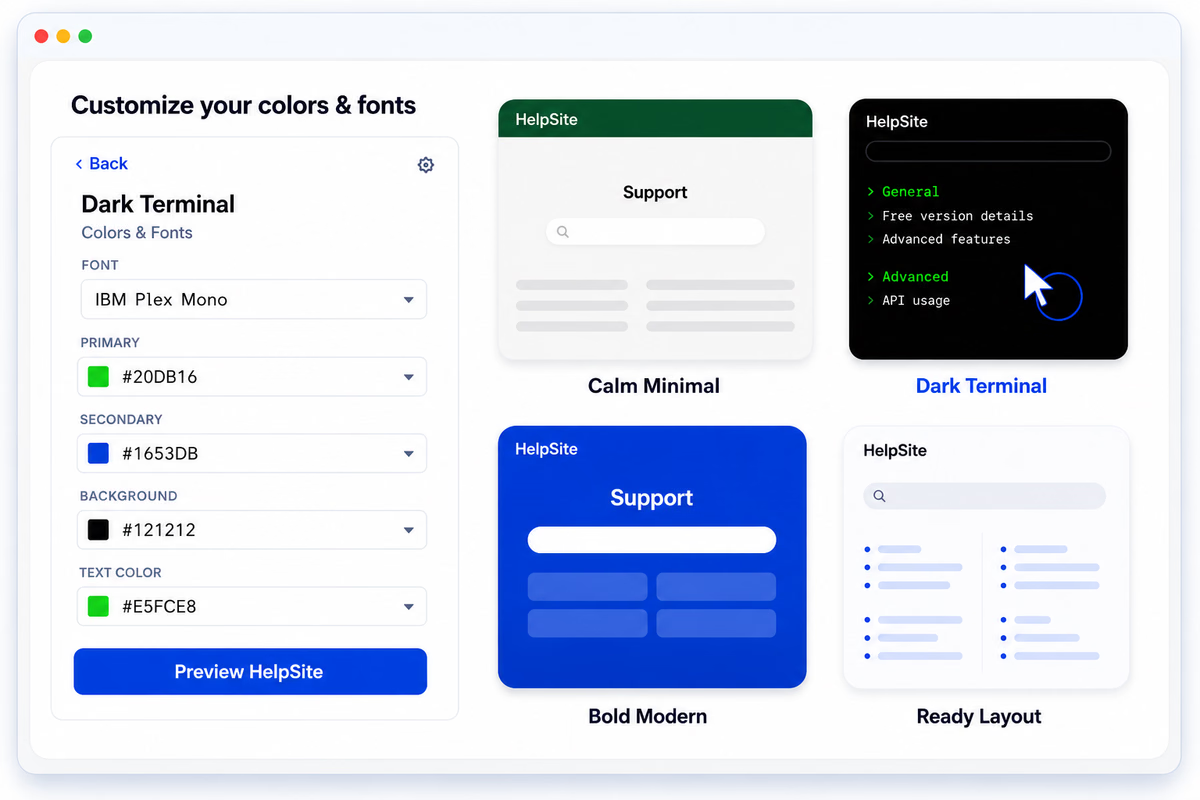
Four starting themes:
- Calm Minimal. An open layout with clean white space and generous typography. Good fit for SaaS and product-led teams.
- Dark Terminal. A structured layout with a more technical feel and darker default styling. Built for technical products and developer audiences.
- Bold Modern. A stronger visual layout with more defined sections and contrast. Works well for consumer brands and marketing-led companies.
- Ready Layout. A flexible, balanced structure that adapts cleanly to most brands.
The default colors and fonts are just starting points. You can change them without touching code. The bigger difference between themes is the page structure: how content is framed, where borders appear, how sections are grouped, and how the help center feels as someone moves through it.
Customization layers, in order of complexity:
- Pick a theme. Done in two clicks.
- Upload your logo and set primary, secondary, background, and text colors.
- Choose fonts that match your visual identity.
- Preview the result before you publish.
- Edit the HTML and CSS (available on Gold and Plus plans) for deeper control.
No team is forced to choose between speed and control. You can launch in 30 minutes with a theme and a logo, then customize deeper later as the brand evolves.
So simple to write an article and get it published on the site immediately. Such a great timesaver.
Melissa C., Head of Product, Events Services
How the customization layers work
Start simple. Get deeper only when you need it.
No-code controls. The visual theme settings handle 80% of brand work for most teams — logo, four colors, font choice, theme selection. No designer or developer required. This is the layer you launch with on day one.
HTML and CSS access. When your brand needs something specific — a unique navigation pattern, an embedded experience, a non-standard layout — the underlying HTML and CSS are editable on Gold and Plus plans. You get the speed of a template-based approach with the control of a fully custom build.
Your own domain. Paid plans include a custom domain and SSL. Host your help center at help.yourcompany.com instead of a third-party URL so every visit reinforces your brand rather than ours.
Distinct branding per site. If you run multiple sites — one customer-facing, one internal, one per product or brand — each site gets its own theme and branding. Manage everything from one HelpSite account. Useful for agencies serving multiple clients and for SaaS companies running separate product lines.
Use cases the Themes release unlocks
Three patterns we see the most:
Agencies serving multiple clients. A different branded portal per client, all managed from one HelpSite account. Each one looks like the client's own product, not a generic agency portal. Our use case for agencies covers the full setup.
SaaS companies running multiple products. A distinct branded help center per product line. Consistent enough across products that internal teams can switch contexts, distinct enough that customers feel they are inside the right product.
Internal vs. external sites. A polished, branded customer-facing site lives next to a leaner internal SOP site, both on HelpSite. The branding signals which one the reader is in without having to read the URL bar.
Client users find it easy to access information, and we find it easy to update and add new information.
Chris D., Co-founder, Information Services
How Themes fits the broader product moment
The Themes release is part of a larger push to make HelpSite the polished, AI-ready home for your support content.
HelpSite AI Chatbot delivers source-backed answers from your articles, so every answer is traceable to a real help center page. HelpSite MCP Server connects your knowledge base to Claude and other MCP-ready AI tools, so your docs power every AI surface your team uses. And Analytics tells you which articles are pulling weight and where the content gaps are.
Themes is the layer on top that ties everything to your brand. The same article that an AI chatbot quotes, that an MCP-connected tool searches, that a buyer self-qualifies in before their demo, now also looks like it belongs to you. Polish at every touchpoint.
For SaaS, agency, and IT teams thinking about how their help center represents them, the new theme controls remove a real friction without forcing you into a heavy redesign project.
Frequently asked questions
Do I need a designer to use Themes?
No. The visual controls — logo, colors, fonts, theme selection — require no design or development skills. You can launch in under an hour with the no-code controls alone.
Can I edit the HTML and CSS for deeper customization?
Yes. Custom HTML and CSS are included on Gold and Plus plans. You get full control over page templates, styling, and embedded experiences beyond the visual theme settings.
Can each site have its own branding if I run multiple HelpSites?
Yes. Every site in your account gets its own theme and branding. Useful for agencies, multi-product SaaS, and teams running separate customer and internal sites.
Will my custom domain work with the new themes?
Yes. Themes work the same way regardless of whether you are on a HelpSite subdomain or your own custom domain.
Can I preview a theme before pushing it live?
Yes. You can preview the entire theme, including your colors and fonts, before activating it. Switch back or adjust whenever you need.
Which plans include which Themes features?
The visual theme controls and ready-made themes are available across plans. Custom domains are included on paid plans. Custom HTML and CSS are included on Gold and Plus. See the pricing page for the current breakdown.
Final thoughts
A help center that does not look like part of your product is a constant, low-grade trust leak. Every customer who lands on it notices. Every buyer who researches you forms an impression. Every AI assistant that cites it propagates your brand — or somebody else's.
Themes fix this without forcing you into a redesign project. Pick a theme, add your logo, set your colors, ship it today. Customize deeper as the brand evolves.