


A support agent notices that a help article tells customers to click "Open your account," but the button now says "Sign in." If the agent can't edit the article, they ask whoever owns the docs to fix it and wait. If they can edit it, they fix it themselves, and nobody checks the change. Most small teams use one of these two setups, and both cause problems.
There's a third setup: anyone on the team can suggest a change, and one person approves it before customers see it. Below is what goes wrong with the first two, how suggesting works in HelpSite, and who should review which articles.
What goes wrong when only one or two people can edit?
Every fix waits for the docs owner, and the docs owner has other work to do.
Take the button example. The agent can't change the article, so they message the docs owner on Slack and ask for the update. The message gets buried under other conversations. Two weeks later, the article still says "Open your account," and three more customers have written in asking where the button went.
The people who notice outdated steps first are the ones closest to customers: support agents, account managers, and the engineer who shipped the change. When every fix means asking someone else to make it, most small fixes never get made.
Try this: search Slack or your team chat for "the article says" or "the doc is wrong." Each result is a fix someone found but couldn't make.
What goes wrong when everyone can edit?
Fixes go live right away, and so do mistakes. A change is public the moment someone saves it, and nobody else sees it first.
Most of those changes are fine. The trouble is the occasional wrong one. Say a teammate updates the refund article from memory and changes the refund window from 60 days to 90. Nobody checks, and customers see the wrong number until one of them asks for a refund on day 75.
Two newer sources of edits make this harder:
- Scripts and syncs. If you update articles from your product repo or another tool, a sync that writes straight to an article can overwrite changes your team made by hand since the last run.
- AI rewrites. When an AI writing tool rewrites a whole article, it's hard to see which sentences changed or spot a fact it got wrong.
Open editing works for a team of two or three who all know what changed. Beyond that, someone needs to see each change before customers do.
How do suggested edits work in HelpSite?
Suggested edits gives you a middle ground. Anyone on your team can propose a change, and a reviewer sees exactly what changed and decides before it goes live. It's built into the article editor, so contributors don't need a separate tool or form.
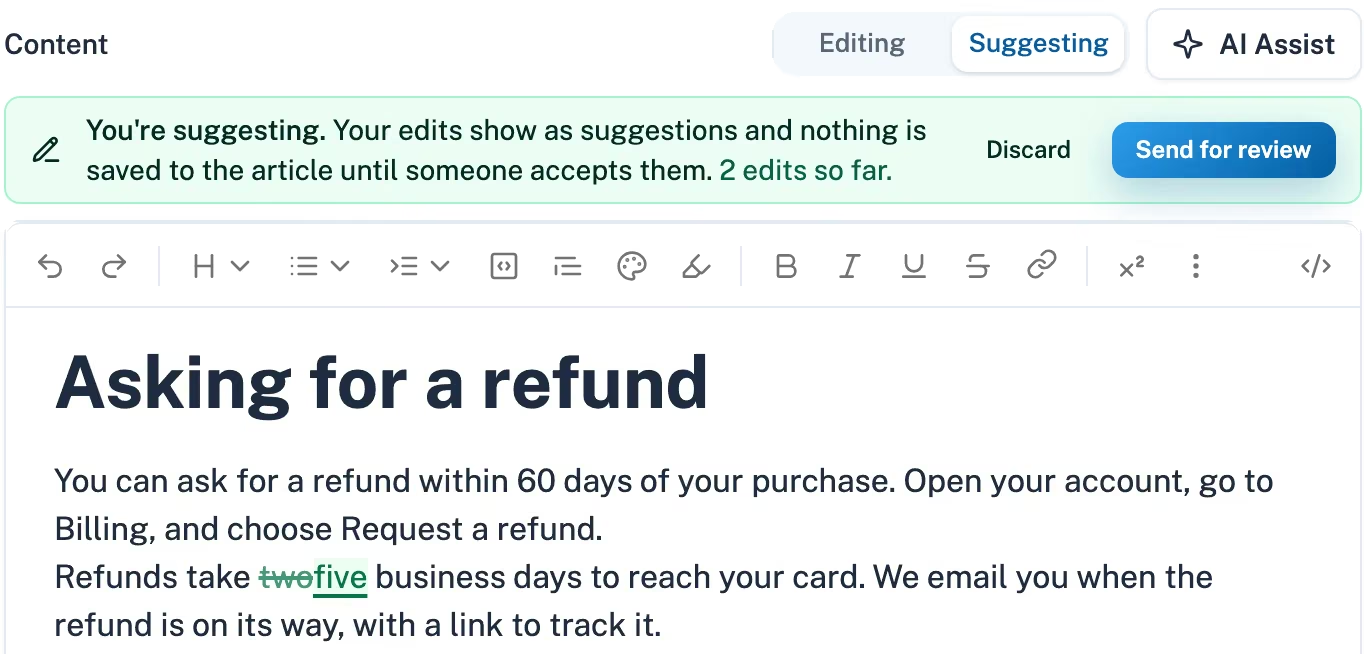
- Switch to Suggesting. Above the editor, flip from Editing to Suggesting and edit as usual. Your changes show in green. Autosave and publishing are off while you suggest, so a half-finished change can't reach your help center. If you change your mind, Discard puts the article back.
- Send it for review. Add a note explaining the change, like "Refunds now take five days, per the new payment processor," and pick a reviewer if you know who should check it. If you leave the reviewer blank, the article's author and last editor get an in-app notification, and the Articles list shows a pending count.
- Review in place. Suggestions show inside the article, in a different color for each person or tool. A bar above the editor counts what's left and steps through each change. Click a change to see who made it, when, and their note, then accept or reject it. When a batch is clearly right, use Accept all.
- Publish when you're ready. Accepted changes go into the article's draft. Customers keep seeing the published version until you publish, and version history keeps the earlier one.
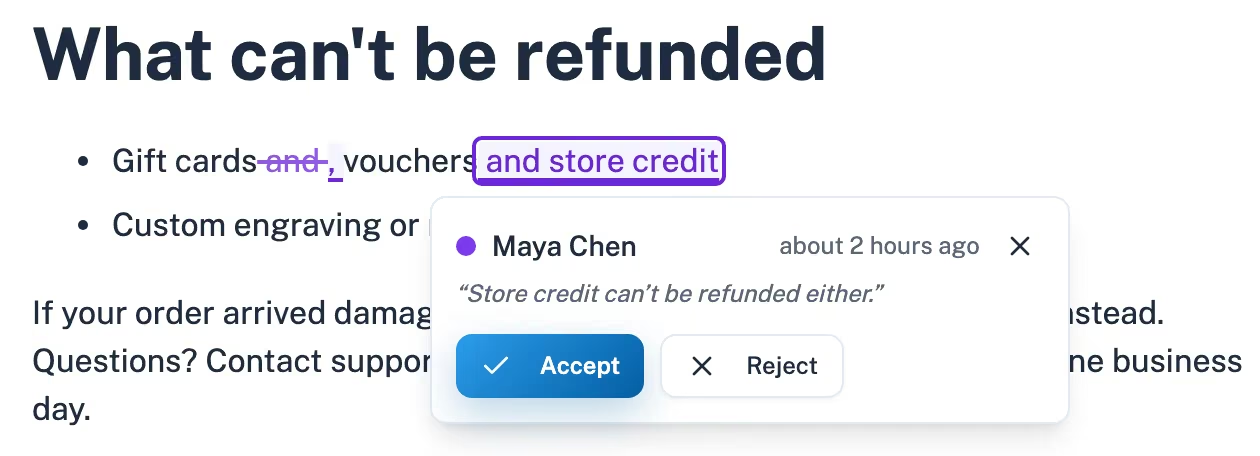
If two people change the same words, HelpSite flags it as a conflict. Accepting one suggestion drops the other, so you never have to merge two versions of a sentence by hand.
Who should review which articles?
A review step works best when the reviewer is the person who knows whether the change is right. For most small teams, that splits by topic:
- Billing, refunds, and policies: whoever owns the policy, usually a founder or ops lead. These are the articles where a wrong number costs money.
- Product how-tos: the support lead, or the product person who shipped the feature.
- Internal SOPs: the process owner. A suggestion lets the person doing the work fix a step, and the owner signs off before it becomes the official process.
- Everything else: whoever wrote the article. If you skip the reviewer field, HelpSite notifies the author and last editor anyway.
Then put the pending count on the agenda of a meeting you already have, so suggestions get reviewed while they're still fresh.
Suggested edits pairs well with Assignments. Use an assignment to ask someone to write or update an article, and use suggestions to approve the wording that comes back. If you're setting up ownership and review cycles more broadly, our guide to help center content governance covers the rest of the system.
Can AI and scripts suggest edits too?
Yes. These are the edits where a review step matters most.
AI Assist. Run AI Assist on an article that already has text, and its rewrite arrives as suggestions. You accept or reject each change one by one, so you can keep the clearer sentence and drop the one that got a fact wrong.
Scripts and the API. Anything that can call the HelpSite API can propose changes instead of writing straight to a live article. Each suggestion can carry a label and a link, such as the commit it came from, so the reviewer knows where it started. If your team edited the article in HelpSite since the script last synced, HelpSite merges both sets of edits in the editor for a person to review, so neither one gets lost.
That matters if you keep docs in sync with your code, like the setup in how Well Lived keeps its help center current with every code change. Sending those updates as suggestions puts a person between the script and your customers.
Frequently asked questions
Should support agents be able to edit the knowledge base?
Support agents should be able to propose changes, because they see outdated articles first. Whether they publish directly depends on the article. For billing, policy, and anything with numbers, have agents suggest the edit and let the policy owner approve it. That keeps fixes fast without letting a wrong number reach customers.
Does a suggested edit change the live article?
No. In HelpSite, a suggestion is kept apart from the published article. When a reviewer accepts it, the change goes into the article's draft. Customers keep seeing the published version until someone publishes, and version history keeps earlier versions so you can roll back if needed.
How does a reviewer know a suggestion is waiting?
If the person suggesting picks a reviewer, HelpSite notifies that reviewer. If they leave it blank, the article's author and last editor get an in-app notification. The Articles list also shows a pending count, so you can see what's waiting without relying on the notification and clear it in a meeting you already have.
What happens if two people suggest changes to the same sentence?
HelpSite flags overlapping changes as a conflict. When the reviewer accepts one suggestion, the conflicting one is dropped, so there are never two versions of the same sentence to merge by hand. Changes to different parts of the same article don't conflict and can both be accepted.
How is suggesting an edit different from an assignment?
An assignment asks a teammate to do article work, like writing, updating, or reviewing, and tracks it until it's done. A suggested edit is a change someone has already written. You can use both: an assignment to request the update, and a suggestion to approve the exact wording.
Final thoughts
Start with the articles where a wrong answer costs you the most. Pick your five highest-stakes articles, usually billing, refunds, and account access, and agree that every change to them goes through a suggestion and one reviewer. Once that habit sticks, open suggesting up to the rest of the team.