

Most help centers go out of date because nobody has clear answers to three questions: who is responsible for this article, when was it last reviewed, and what triggers an update when something changes?
Content governance is the system that answers those questions before they become problems. For a help center, that means defining ownership, building review cycles into the workflow, using data to find articles that have drifted out of date before a customer does, and automating the updates that follow product changes.
This guide covers what content governance means in a help center context, the five elements that make it work in practice, and how to put each one in place without turning documentation into a full-time job.
What is content governance for a help center?
Content governance is the set of rules and processes that determine how documentation is created, reviewed, updated, and retired. In a help center, it answers: who owns each article, how often it is reviewed, who approves changes before they go live, and what signals trigger an update.
The term gets used in enterprise content strategy, but the underlying need applies to any team maintaining articles that customers rely on for accurate information. A ten-article help center and a five-hundred-article one both need to know who is responsible for keeping each article current.
Without that system, accuracy becomes accidental. Articles get updated only when someone happens to notice a problem.
What breaks without content governance?
The problems tend to follow a predictable pattern.
Stale articles accumulate silently. A product ships a new feature. The team is focused on the launch. Three months later, a customer reads an article about a workflow that no longer exists and contacts support. The article has been wrong since the launch. Nobody had a system to catch it.
Ownership is assumed and never assigned. When everyone is loosely responsible for documentation, the practical result is that nobody is specifically responsible. An article about the billing process might sit unclaimed for a year because it is not clearly anybody's job to keep it current.
Review happens by accident. Some articles get reviewed frequently because they come up in support conversations. Others sit untouched because they are rarely cited, even if the information they contain has changed significantly.
AI chatbot answers degrade with the content. A team running HelpSite's AI Chatbot on a stale knowledge base will see it return answers that are technically sourced but no longer accurate. The chatbot answers from your articles. If the articles are wrong, the answers reflect that. Governance keeps the source material the chatbot draws from trustworthy. Our guide to AI-powered help centers covers why source accuracy is so critical when AI is involved.
What are the five elements of help center content governance?
1. Ownership
Every article should have a person who is accountable for its accuracy. That person may delegate the actual writing, but they own the accuracy: they get notified when a review is due, review the content when it is flagged, and coordinate any changes needed.
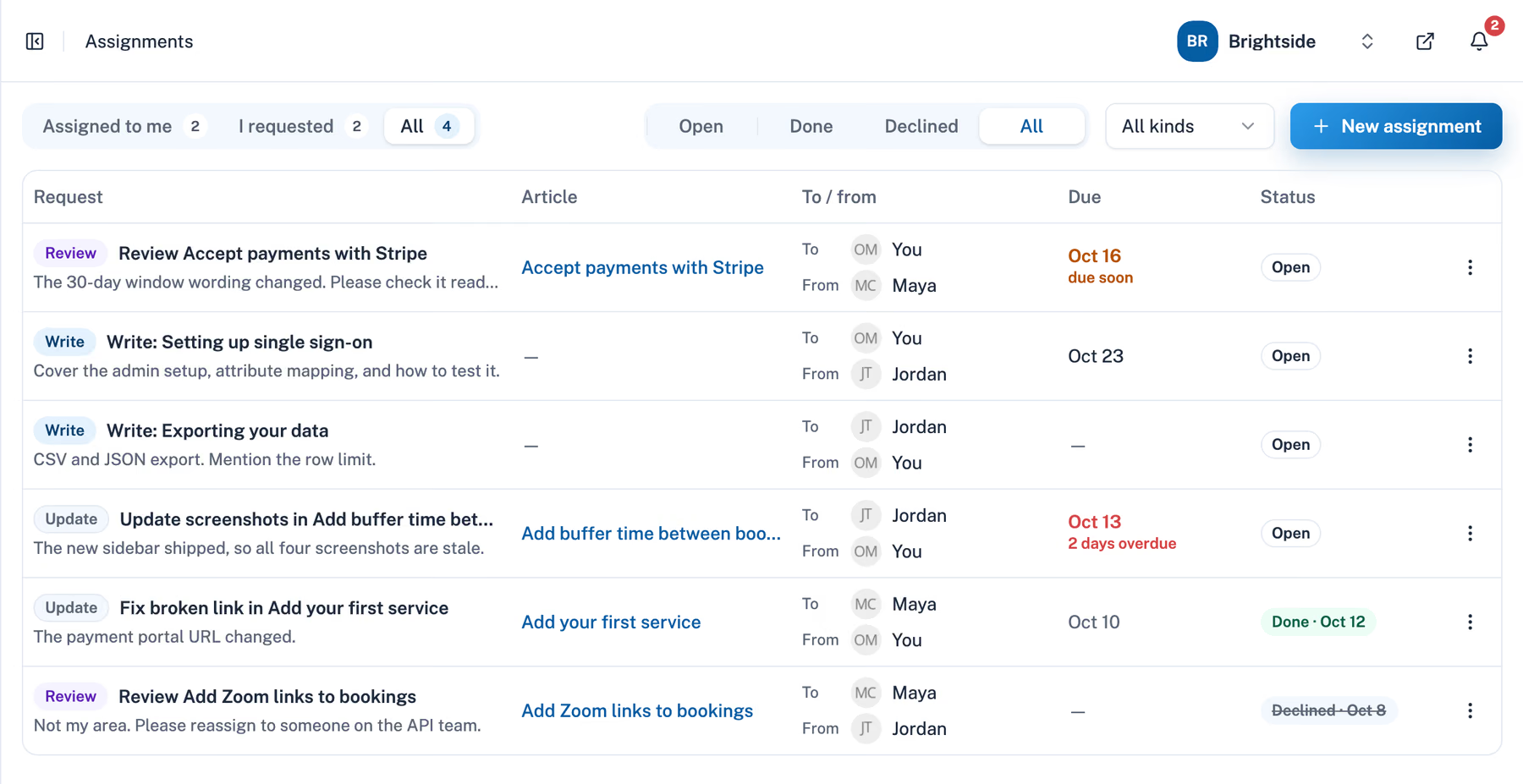
Ownership starts as a team agreement. HelpSite's Assignments feature, available on select plans (see pricing), makes it operational: you can send a Review assignment to the person responsible for a specific article, set a due date, and get notified when the review is complete. The article has a named person attached to it who closes the loop.
2. Review cycles
A review cycle is a scheduled check on whether an article is still accurate. How often depends on the content type. An article covering a core product workflow might need a review every quarter. A troubleshooting article about a stable feature might only need attention after a major release.
The trigger can be time-based (review every 90 days), event-based (review after a product update), or data-based (review when Analytics shows searches that get few clicks, or chatbot conversations where the answer missed). In practice, all three are useful. Time-based cycles catch articles that drift slowly. Event-based triggers catch articles made inaccurate by a specific change. Data-based signals catch articles that are failing customers right now.
3. Approval workflow
For teams where accuracy carries real stakes, an approval step before publication reduces the risk of an incorrect article reaching customers. Someone reviews the draft, checks it against the current product behavior, and signs off before it goes live.
HelpSite's Review assignment type fits directly into this workflow. When a writer finishes updating an article, they can send a Review assignment to a subject matter expert or team lead. The reviewer sees the open review in the editor, checks the article, and marks the assignment done. Assignments record the sign-off without blocking publishing, so agree as a team that changes wait for the review. Version history with author attribution means you can see exactly what changed and when.
4. Data-driven updates
The fourth element is using your help center's performance data to identify which articles need attention.
HelpSite Analytics shows which articles get the most views, which searches get few or no clicks, and what visitors ask your AI Chatbot. A search that leads nowhere, or a chatbot question that keeps coming back, is a signal that an article needs improvement or that a new article needs to be written. Our knowledge base audit guide walks through a lightweight monthly process that pairs well with this data.
Running a monthly analytics review and converting the top findings into Assignments is a lightweight system that covers most of what content governance needs to do in practice. The data tells you what to fix. Assignments makes sure it gets done.
5. Automated updates
The first four elements catch articles after they have gone stale. The fifth keeps them from going stale: when your product changes, the articles that describe it change in the same piece of work.
In practice, the help articles are kept as files next to the product's code, an approach often called docs as code, and whoever makes a change (a developer or an AI coding agent) follows a standing rule: any change a customer would notice updates the matching article in the same commit. When the change is deployed, an automated step such as a GitHub Action runs a short script that sends the updated articles to your help center through the HelpSite API, so the product and its documentation go live together.
Well Lived, a time and energy tracker, runs its 41-article HelpSite help center this way. In its first four weeks, 85% of article updates shipped in the same change as the code they describe, and screenshots are retaken automatically from a demo account. The full walkthrough covers the setup step by step.
Automation changes what the other four elements are for. Ownership becomes owning the rule and checking what it produces. Review cycles get shorter, because most product-driven edits have already happened. Analytics and Assignments are left for the gaps a code change cannot see, such as a question customers keep asking that no article answers.
API access is included on select plans. If you would rather not build the workflow yourself, the done-for-you team can set it up.
What does a simple governance system look like for a small team?
A team of two or three people managing a help center does not need a formal editorial board. A practical minimum looks like this.
Each article has a named owner recorded in the article or in a shared doc. The team runs a quarterly review cycle: the content manager uses Analytics to pull the most-viewed articles and the searches that got no clicks, creates Review or Update assignments for the five to ten most critical ones, and assigns each to the relevant subject matter expert. Due dates are set three weeks out. The content manager gets an email when each assignment is marked done.
For new features, the process runs on the event trigger: when something ships, the relevant team lead creates Write or Update assignments for any articles that need to reflect the change. Those are worked before the feature reaches customers.
That is the whole system. It needs an owner for each piece of content and a lightweight way to request and track review work. If your product changes often, add the automated updates from element five once the basics are working.
What to do this week based on your role
Support lead: Pull your Analytics data and find the five most common searches that get few clicks, and the articles that should answer them. Send Update assignments to the people who own those product areas with two-week due dates. That is your first governed review cycle.
Content manager: Create a simple ownership map: article category, owner, last reviewed date. If you do not know the owner for more than a third of your articles, that is the problem to solve before anything else.
CS manager: Use chatbot conversation data to find the questions your AI Chatbot is answering poorly. Each one is either a missing article or a stale one. Send Write or Update assignments for the top five.
Team lead for a new feature launch: Before the feature ships, create Update assignments for every article that will be affected. Set due dates that land before the launch date. Do not let the feature outpace the documentation.
Developer or product lead: Pick one area of your product that changes often and move its articles into your code repository. Add the rule that a visible change updates its article in the same commit, and publish through the HelpSite API on deploy.
Frequently asked questions
What is content governance in the context of a help center?
Content governance is the system that defines who owns each article, when it gets reviewed, who approves changes before they go live, and what triggers an update when something changes. With it, accuracy no longer depends on someone noticing a problem.
How often should help center articles be reviewed?
It depends on the content type and how much the underlying product changes. A common starting point is quarterly reviews for core workflow articles, event-triggered reviews after product updates, and data-triggered reviews when Analytics shows an article is underperforming. Fast-moving product areas need shorter cycles.
How does HelpSite support content governance?
HelpSite's Assignments feature lets you send Write, Update, and Review requests to specific teammates, with due dates and email notifications in both directions. Analytics shows which articles need attention based on search, traffic, and chatbot data. Version history with author attribution tracks what changed and who made the change.
What happens to AI Chatbot accuracy if articles are out of date?
HelpSite's AI Chatbot answers from your published articles. If those articles contain outdated information, the chatbot returns answers based on what the articles say. Keeping articles current through a governance process directly protects the quality of chatbot answers.
Can help center updates be automated?
Yes. If your articles are kept as files next to your product's code, each product change can update the matching article in the same commit, and a script can publish it through the HelpSite API on deploy. Well Lived runs its HelpSite help center this way, and 85% of its article updates ship with the code they describe.
Do I need dedicated documentation staff to run content governance?
No. A lightweight system built around ownership, quarterly analytics reviews, and event-triggered assignments can be run by whoever manages the help center as part of their normal workflow. The overhead is low when the system is set up correctly and tooling like Assignments handles the notification and tracking.
Final thoughts
Content governance protects trust. Customers who find an outdated article and contact support anyway have learned that your help center is not reliable, and that lesson is hard to undo.
The system can stay simple. Know who owns each article, review on a schedule, use data to find what is failing, close the loop when work is done, and let product changes update their own articles where you can. That is enough to keep a help center accurate at a pace most teams can sustain.