

Every growing knowledge base eventually has the same problem.
Articles pile up. Some are still useful. Some describe features that shipped two years ago and got renamed. Some are duplicates of three other articles that say roughly the same thing in slightly different ways. Some have not been opened by a human since the day they were published.
This is content debt. It is the help center equivalent of code debt: easy to ignore for a quarter, painful for years. And like code debt, the fix is not a heroic rewrite weekend. It is a simple triage habit you run regularly, with a clear decision framework that prevents the same articles from getting reworked over and over.
This post is that framework.
What content debt actually looks like
It shows up in three forms. Most knowledge bases have all three at once.
Stale articles. The content is technically still there, but the screenshots are outdated, the steps reference a setting that moved, or the article mentions a pricing tier that no longer exists. Customers find it, follow it, fail, and file a ticket anyway.
Duplicate articles. Three different articles answer roughly the same question. None of them is wrong. None of them is canonical. Search returns all three, the customer picks one at random, and your AI chatbot (or any AI tool reading your docs through an integration like an MCP server) struggles to decide which to quote. Our AI Help Center Guide covers why this hurts AI accuracy specifically.
Orphan articles. Nothing in your help center links to them. They were written for one specific incident or one specific customer, never indexed properly, and now they sit in a corner pulling no traffic and serving no purpose.
Three different problems, one common fix: a regular pass through every article with a clear triage decision.
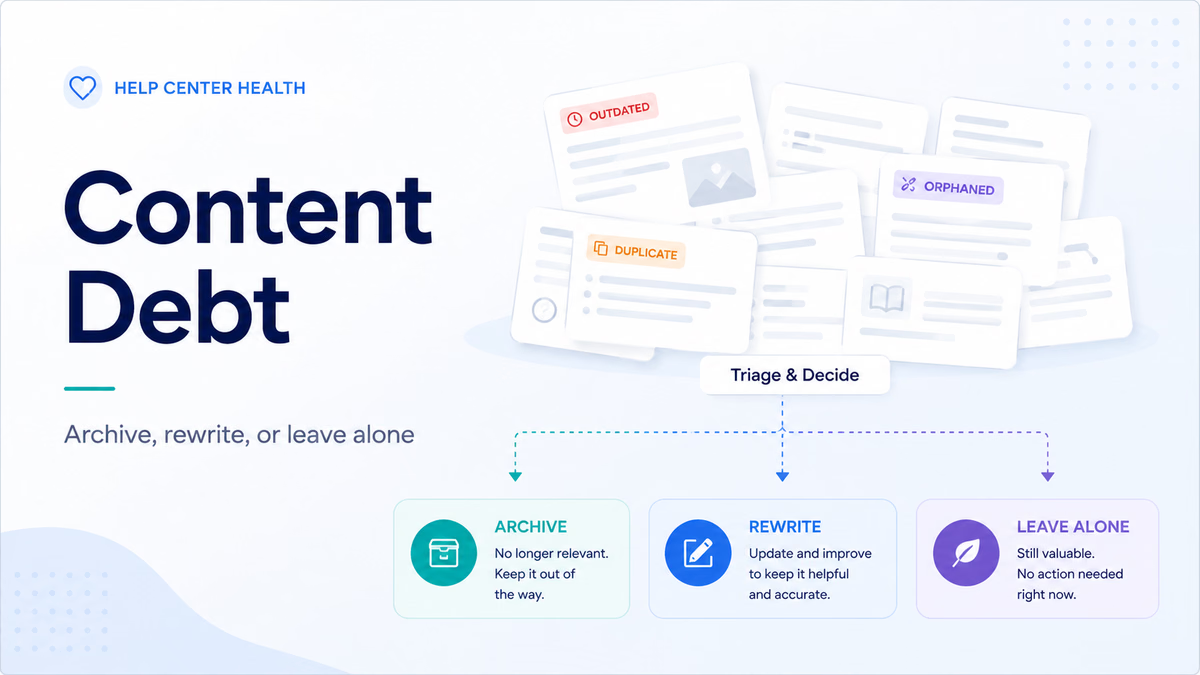
The triage framework: archive, rewrite, or leave alone
Every article in your knowledge base belongs in one of three buckets. The triage is fast once you commit to the framework.
Archive when:
- The topic is no longer relevant (feature removed, product line discontinued, policy retired).
- The article gets fewer than five visits a quarter AND the content is wrong.
- A better article already covers the same question and you cannot consolidate cleanly.
Archive does not have to mean delete. Most teams move archived articles into an internal-only folder so the content is preserved for reference without confusing customers or AI tools.
Rewrite when:
- The topic still gets traffic but the content is outdated.
- The article is confusing, buried, or does not lead with the answer.
- It would be a great article with a question-led title and a clearer first paragraph (the same structural patterns we covered in our post on writing for non-technical users).
Leave alone when:
- The article is accurate, gets traffic, and works for both human readers and AI tools.
- Engagement metrics look healthy (low bounce, reasonable time on page).
- There is no obvious next move that would meaningfully improve it.
The last bucket is the hardest to honor. Teams love to tinker. Resist the urge. Spend your writing time on the articles that need it.
We use HelpSite to manage our help pages for all of our products. We have also recommended it to other businesses who now use it. It has always been a great, simple resource. It does what it says really well.
Jatin P., Owner, Computer Software
A practical audit you can run in one afternoon
You do not need a new tool. You need a quiet afternoon and a willingness to be honest about which articles are pulling their weight.
Step 1: Pull every article sorted by traffic. Most help center platforms surface this directly. Top of the list is where you start.
Step 2: Scan the top 20 for staleness. Open each. Does it mention an old feature name? An old screenshot? A discontinued tier? Flag it for rewrite.
Step 3: Find the duplicates. Search your top five most common keywords. If three articles return for "cancel subscription," you have a consolidation candidate. Pick the strongest article, rewrite it to be the canonical answer, and redirect the others.
Step 4: Look at the bottom of the traffic list. Articles in the lowest 10% of traffic are usually orphans, outdated, or both. Triage each one into archive, rewrite, or leave alone.
Step 5: Assign owners. Every article that needs work should have a name next to it. Without ownership, the audit becomes another doc that sits in a folder. HelpSite's article assignment and request feature is built for this exact handoff: you flag an article, assign it to a teammate, and the work moves without anyone losing track.
The whole pass takes two to four hours for a typical 50-article knowledge base. Bigger KBs split the audit across categories and run it over a few sessions.
I use this primarily to keep my staff informed of changes to our business as well as storing SOPs for quick access. This software is wicked quick and incredibly useful. Staff love having a quick answer to their questions.
Nicholas S., Student Pastor, Religious Institutions
How HelpSite helps you stay ahead of debt
The best fix for content debt is to never let it accumulate in the first place. HelpSite supports that with the patterns the audit above relies on.
Analytics surfaces low-traffic and bounce-heavy articles automatically, so you know where to look without exporting CSVs. Article assignment and requests keep the next move on every article assigned to a person with a clear deadline. And our 30-minute knowledge base audit guide gives you the lightweight monthly cadence we recommend so debt never reaches the "we need a content sprint" stage.
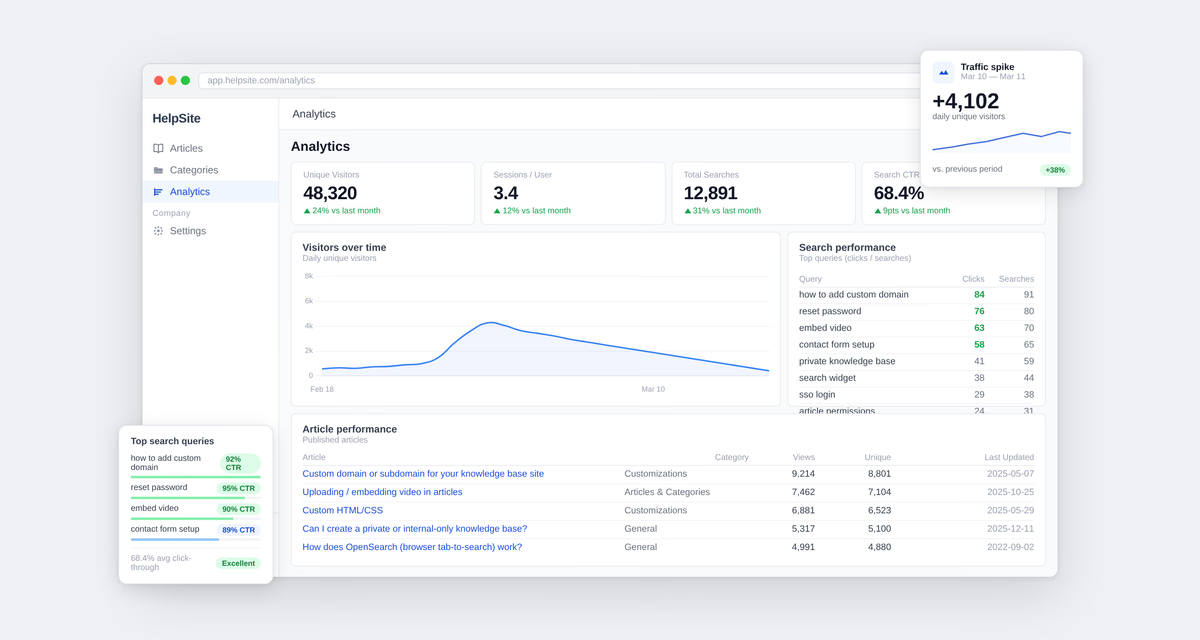
For SaaS, IT, and support teams shipping fast, that means the help center keeps up with the product instead of falling steadily behind it.
Frequently asked questions
How often should we audit our content?
A monthly light pass and a quarterly deeper pass works for most teams. The monthly cadence catches obvious staleness fast. The quarterly review handles the harder consolidation calls and the orphan cleanup.
Should we delete or archive?
Archive is almost always the right call. Deletion breaks inbound links and removes the audit trail. Move archived articles to an internal folder so the content is preserved but not surfaced to customers or AI tools.
What if an article still ranks well but the content is outdated?
Rewrite it in place rather than killing it. The URL has accumulated SEO authority that you want to keep. Update the content, refresh the meta description, and the search ranking carries over.
How do we prevent content debt from accumulating in the first place?
Three habits move the needle most: every shipped feature gets a doc owner before launch, every internal Slack question that requires an explanation longer than three sentences becomes an article, and every article has a quarterly review date.
Do we need tools beyond HelpSite Analytics for this?
Most teams do not. If you want sitewide context, pair HelpSite Analytics with Google Analytics 4 or Plausible. If you want to see where readers get stuck on a specific article, Hotjar or Microsoft Clarity for session recordings are useful add-ons.
Final thoughts
Content debt is not a single dramatic problem. It is a slow accumulation. The teams who manage it best are not the ones running quarterly content sprints. They are the ones running a 30-minute pass once a month and a tighter quarterly review.
Open your analytics this week. Pick one article at the top of the failed-search list and one at the bottom of the traffic list. Decide which bucket each belongs in. Make the first move.