

An AI chatbot that answers in seconds only helps if people can trust what it says. The first time a customer catches a confident, wrong answer, they stop believing the next ten and go back to filing tickets—even though most would rather solve the problem themselves.
Trustworthy chatbot answers need evidence people can check. HelpSite grounds responses in published content and shows the relevant source when one supports the answer. It does this through two layers of the same AI Chatbot experience—the conversational surface people type into, and the sourced-answer layer that links each answer back to a real article.
Below is a five-step process for making your chatbot's answers more trustworthy, followed by how the two layers fit together and when each one matters more.
How to make your AI chatbot answers more trustworthy
Trust comes less from the model and more from what the chatbot reads and what it shows the reader. Five steps get you most of the way there.
1. Write the answer down before you automate it
A chatbot can only be as accurate as the content behind it. Start by publishing the questions your team answers over and over as help articles, so the AI has something real to draw from. Our post on why knowledge bases matter for AI chatbots covers why documentation comes first.
2. Ground the bot in your published content only
Point the AI at your knowledge base instead of the open web, so it answers from what you documented rather than what a general model happens to assume. This is the idea behind retrieval-augmented generation: retrieve the relevant source first, then compose the answer from it. HelpSite AI Chatbot reads only your published articles for exactly this reason.
3. Show the source on every answer that has one
Surface a link to the article each answer drew from, so customers, agents, and buyers can open it and confirm. This is the single step most standalone chatbots skip—and it is where AI hallucinations do the most damage, because a confident answer with no source is impossible to check before someone acts on it.
4. Make "I don't know" a real answer
When the chatbot cannot find something, it should say so and route the person onward rather than guessing. An honest miss keeps trust intact and gives you a signal: each blank is a content gap worth filling.
5. Review the gaps and keep high-stakes articles current
Use your chatbot's search history to see which questions came up empty, then write the missing articles. Keep pricing, compliance, and security pages reviewed and dated—those are the topics where a wrong answer costs the most.
The two layers below are how HelpSite makes these steps the default rather than something you have to assemble.
What AI Chatbot does
AI Chatbot is the customer-facing (or team-facing) surface. It is the box a user types into on your help center or inside your product, and the AI that answers back in seconds.
The value is speed and coverage. Customers ask questions in natural language and get direct answers without scrolling through search results. Common patterns include "how do I cancel my plan," "does this integrate with Salesforce," and "what happens if the invite expires." Every question the chatbot handles well is a support ticket that never gets filed and a customer who solves their problem faster.
HelpSite AI Chatbot reads only your published knowledge base articles, so answers stay bounded to what you actually documented. That grounding keeps responses tied to your product and out of the open internet.
What Sourced AI Answers does
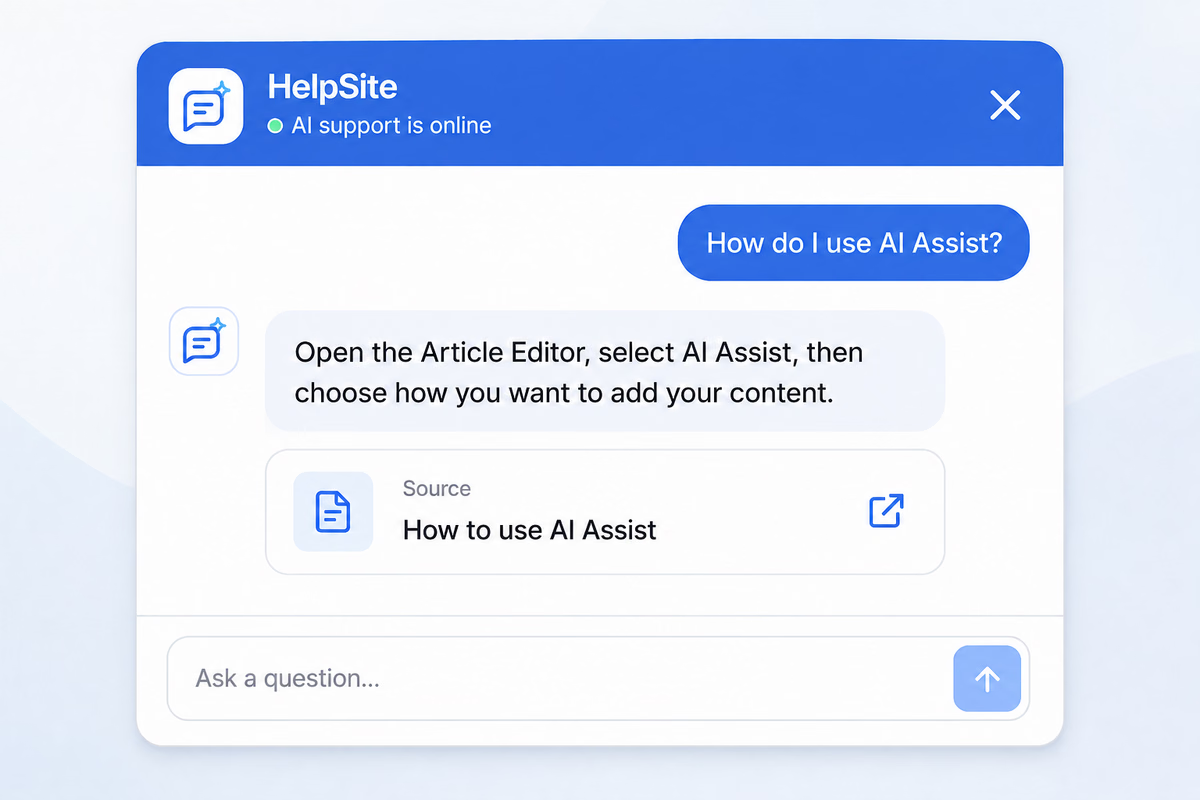
Sourced AI Answers is the layer underneath the chatbot's responses that shows where an answer came from. When the AI draws on one of your articles, it surfaces a visible link back to that help center article so the person reading can open the source and check it.
The value is trust. Generic AI chatbots produce plausible-sounding answers that customers cannot easily verify. When something goes wrong—a made-up feature, a wrong step, an outdated price—the customer has no way to know before they act on it. Sourced AI Answers closes that gap by making answers auditable: users click through to the source article and confirm it for themselves.
This matters for three groups at the same time:
- Customers trust the answer because they can verify it.
- Support teams trust the AI because they can see it is drawing on real docs it can cite.
- Buyers trust the platform because the "how do I know this is right" question is already being answered.
There is nothing to switch on. Sourced answers are how HelpSite search and AI responses work for every account, not an add-on you enable or a line item on a plan.
Simple no-frills knowledgebase software that does not try to be anything else. Universal search works very well. Simple layout that is easy to blend into your current website.
Ben L., Tech Support, Recreational Facilities and Services, verified on Capterra
How they work together
Think of it as one product with two layers.
- The interface layer. AI Chatbot is what the user sees and interacts with. Conversational, natural-language, fast.
- The trust layer. Sourced AI Answers makes a response checkable. Answers link back to source articles the reader can open.
When a customer asks a question in the chatbot, a few things happen together. The AI searches your published knowledge base for relevant content. It composes an answer grounded in that content. And when it draws on an article, it surfaces that source alongside the answer so the customer can dig deeper or verify.
That last step is what most standalone chatbots skip. And it is the step that separates a chatbot people trust from one they eventually tune out.
When each one matters more
Both are part of the same experience when you use HelpSite AI Chatbot. But different situations put more weight on one layer or the other.
When AI Chatbot matters more. High-volume, straightforward support questions. Common integrations, basic account settings, "how do I do X" flows. The chatbot handles these at speed and the user rarely feels the need to click through to the source.
When Sourced AI Answers matters more. Regulated industries (fintech, healthcare, enterprise IT) where the buyer or end user needs to verify claims. Answers involving pricing, compliance, security, or legal terms where "the AI said so" is not enough. Situations where a wrong answer creates real risk downstream. Our post on private knowledge base security covers why source-backed answers are becoming table stakes for security-conscious B2B buyers.
When both matter equally. Almost every customer conversation. The chatbot gives the fast answer, and the source backs it up.
The underlying philosophy: AI grounded in your content
Every generative AI feature HelpSite ships follows the same principle: AI should be grounded in your actual content, and answers should be traceable back to a source.
That is why HelpSite's AI Chatbot only reads your published articles instead of guessing from general training data. It is why answers are designed to show the source they came from. And it is why the HelpSite AI KB Generator lands every article in review rather than publishing it, so a human editor verifies accuracy before anything goes live.
The goal is AI that behaves like a trustworthy colleague—fast, current, and able to point back to where an answer came from. Paired with analytics that let you review the questions people asked the chatbot and the searches that came up empty, you get a practical loop between what you write and what customers actually ask.
Easy to use. Works as advertised. Helps a lot with training.
Lucas M., IT Analyst, Information Technology and Services, verified on Capterra
Frequently asked questions
Do we need to enable both or is one enough?
Neither is a switch you flip. Sourced answers are built into how HelpSite search and AI responses work for every account, so the chatbot arrives with them already on.
Can we use Sourced AI Answers without the chatbot interface?
Yes—sourced answers apply wherever AI surfaces your content in HelpSite, including search. If you connect your knowledge base to external AI tools via the MCP Server, HelpSite returns the source article alongside the content, so those tools have what they need to cite it.
Will the chatbot ever surface internal or private content to customers?
No. The chatbot answers from whatever the reader already has access to and nothing more. On a public help center that means your published articles only. On a private or gated site, your team gets answers drawn from your internal SOPs—behind the same access controls that protect the articles themselves.
What happens when the chatbot cannot find an answer in our knowledge base?
It tells you it could not find one instead of guessing. Each "I could not find an answer for that" is a signal that a content gap exists—review those in your chatbot search history and use them to prioritize what to write next. Our post on why customers still submit tickets covers this diagnostic in detail.
How is this different from a general AI chatbot vendor?
Two things. First, HelpSite AI Chatbot draws only from your published knowledge base, which makes it far less likely to invent features you do not have. Second, answers surface the source article, so customers and internal teams can verify them. Most general AI chatbot vendors do neither well.
Does the chatbot work on our custom domain?
Yes. AI Chatbot works on any HelpSite help center, including sites running on a custom domain.
Final thoughts
The AI chatbot market is crowded with tools that produce fast, confident, unverifiable answers. That model works until the first wrong answer reaches a customer. Then it stops working.
HelpSite AI Chatbot ships with Sourced AI Answers built in so trust and speed work together. Answers arrive fast, stay grounded in your published content, and point back to the source behind them. Follow the five steps above and your chatbot becomes something your customers and team can actually rely on.