


Here's what changed in HelpSite this month: a rebuilt way to assign documentation work, more useful Analytics, a feedback loop for the AI Chatbot, and a few smaller fixes that make day-to-day editing easier.
What's Just Launched
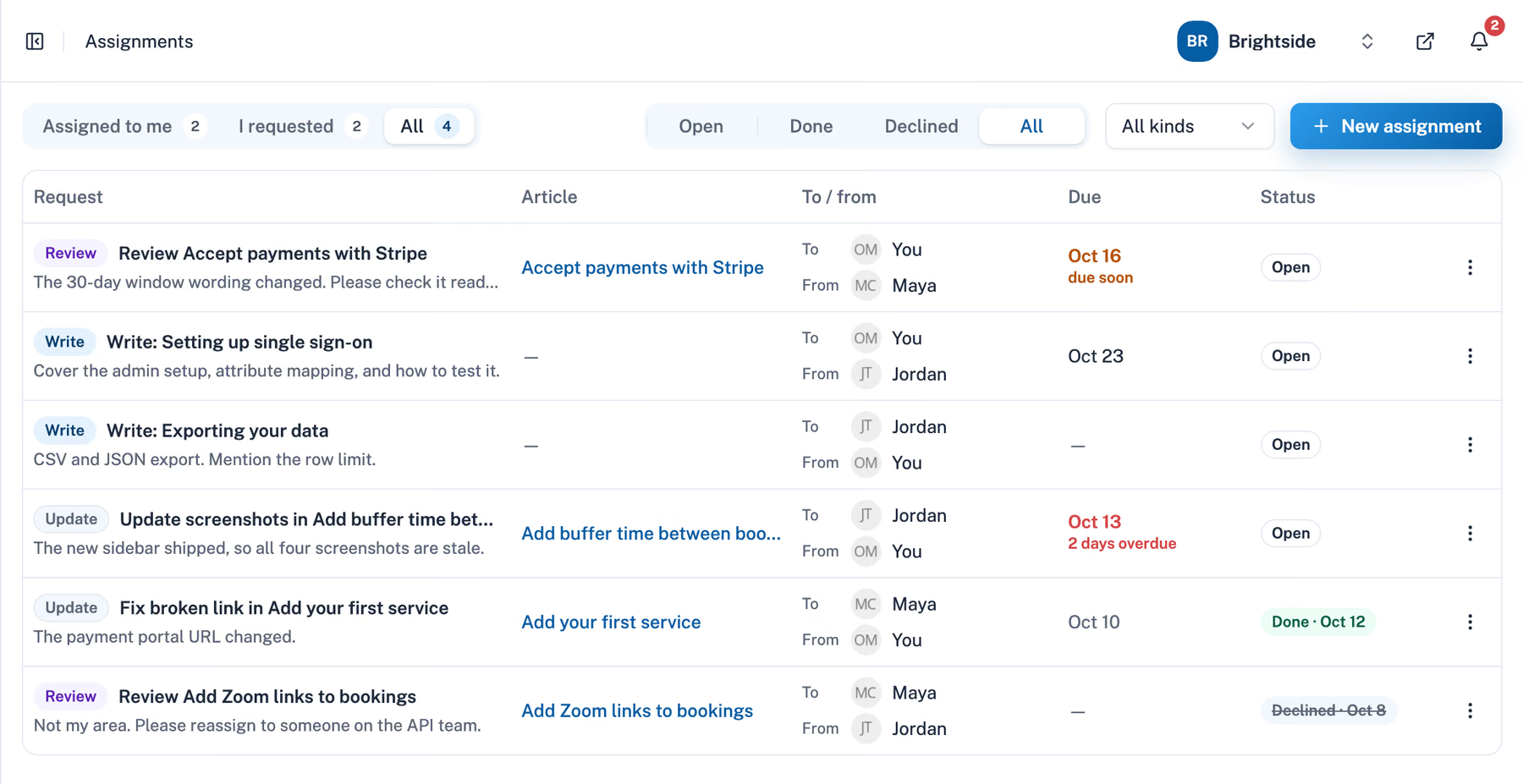
Assignments: A Better Way to Manage Your Team's Content Tasks
We've upgraded Article Requests into a more complete Assignments system, making it easier for your team to manage writing, updating, and reviewing articles directly inside HelpSite.
With the new Assignments, you can:
- Assign teammates to Write, Update, or Review articles.
- Set due dates and track progress with Open, Done, and Declined statuses, including the option to reopen assignments.
- Receive email and in-app notifications when tasks are assigned or completed.
- Access a dedicated Assignments page with tabs (Assigned to me / I requested / All) and status filters.
- Give assignments to AI assistants like Claude through the HelpSite MCP Server. The assistant does the writing, then hands the work back to the requester for review.
Assignments is included on the Max plan. It keeps your team coordinated and your knowledge base current without a trail of separate emails or messages.
Analytics: More Ways to Understand Your Knowledge Base
We've added new tools to HelpSite Analytics to give you a clearer view of how visitors use your knowledge base and where your content could improve.
With the updated Analytics, you can:
- Compare your help center's performance with the previous period to see what's changed.
- Switch between Visitors, Page Views, and Searches to understand activity trends.
- Find content gaps by spotting search queries that aren't getting clicks.
- Export article and search data to CSV for easier reporting.
- Read AI Chatbot conversations directly in Analytics, with full threads, cited sources, and search across questions (on Pro and Max).
AI Chatbot Feedback: Learn What Your Visitors Think
We've added new feedback options to HelpSite's AI Chatbot, so you can see how helpful its responses are to your visitors.
Visitors can now give a 👍 / 👎 rating on chatbot answers. After 15 minutes of inactivity, the chatbot also offers an optional short survey to gather more feedback.
This shows you which answers are working well and where your knowledge base might need more information.
More Updates You'll Love
We've also rolled out a few smaller updates to make creating and managing your knowledge base easier:
- Preview articles before publishing: See how unpublished changes will look in your HelpSite's actual theme before making them live.
- Avoid overlapping edits: Get notified when another teammate has the same article open, with options to reload or overwrite so you don't accidentally replace someone else's work.
- Personalize your profile: Upload your own profile photo with a built-in crop and resize tool. Your photo appears in the team list, article author picker, and sidebar.
Many of these came straight from customer suggestions. If there's something you'd like to see next, tell us.
Don't Have Time to Build Your Knowledge Base? We Can Do It for You.
If building and organizing your knowledge base keeps getting pushed down the list, our new Done-for-You service can take it off your plate.
Send us your existing docs, FAQs, and other support content, and our team will turn them into a clear, searchable HelpSite knowledge base.
We'll help with:
- Planning your knowledge base structure and article list
- Writing sample articles for your review
- Writing, organizing, and publishing the full knowledge base
- Setting up your HelpSite
- Training your team so you can keep everything up to date
Limited pilot spots are currently available at 50% off in exchange for feedback and a short case study.
Share Your Story with Us
We'd love to hear how you're using HelpSite. If you're open to being part of a case study, we can shine a bit more light on your work and help more people find your brand. Get in touch and we'll walk you through the next steps.
Earn $50 Credit with HelpSite
As a small thank-you, we've rolled out a simple Referral Program you can use to invite coworkers, clients, or friends who might benefit from HelpSite.
You can earn a $50 credit for every new customer you refer. When someone signs up through your link and stays active for 90 days, the credit is added to your account. (Available for paying customers.)
How to start:
- Join the referral program and get your unique link.
- Share it with a friend or colleague.
- Get a $50 credit when they become a paying customer and stay active for 90 days.
Want to stay more connected?
- Log in and explore what's new
- Get two months free by switching to annual billing
- Follow us on X and LinkedIn
- Catch up on our latest blog posts for updates, tips, and ideas to get the most out of HelpSite