

If you have been hearing the acronym MCP in product meetings lately and quietly nodding along, this post is for you.
MCP stands for Model Context Protocol. It is one of the most important changes happening to how AI assistants connect to your data in 2026, and it has direct consequences for your help center. You do not need to be an engineer to understand it. You need to know what it is, why it matters for your docs, and what to do about it.
What is MCP, in one paragraph
MCP is an open standard for connecting AI assistants to outside data sources, tools, and systems. Before MCP, every AI tool that wanted to read your help center or your internal docs had to be wired up with a custom integration. MCP replaces those one-off integrations with a shared protocol. If your knowledge base speaks MCP, any AI assistant that speaks MCP can read it cleanly. Think of it as the USB-C of AI data connections.
That is the whole concept. The benefit you care about is on the outside: fewer brittle integrations, more AI tools that read your content accurately, and a knowledge base that quietly becomes more valuable as the ecosystem grows.
Why MCP matters for your help center
Three reasons, in order of how soon you will feel them.
The audience for your docs is expanding fast. A year ago, your help center was read by your customers, your support agents, and the occasional crawler. Today it is also being read by ChatGPT, Claude, in-product AI chatbots, internal RAG pipelines, and autonomous agents acting on behalf of users. MCP accelerates that trend by making it easy for every new AI tool to plug in. Our AI Help Center Guide covers the structural changes that make content readable to AI. MCP is the connective tissue that lets those structured docs reach further.
The cost of bad docs is going up. When only humans read your help center, a vague article was annoying. When five AI assistants read it through MCP and all confidently hallucinate the same wrong answer, you have a brand problem.
MCP is showing up in buying decisions. Buyers in fintech, healthcare, and enterprise IT are asking whether the tools they evaluate can plug into their AI stack through MCP. That includes their knowledge base tool. Vendors who get this right early land on procurement shortlists. Vendors who do not quietly drop off them.
It provides exactly what we need and has a very competitive price.
Josh G., CTO, Oil and Energy
How MCP changes who reads your docs
Today, when a customer asks a public AI assistant a question about your product, the assistant might guess or pull from a stale scrape of your website. With MCP, it can ask a live MCP server for your latest help articles and quote them directly.
The same applies inside your own product. An AI assistant embedded in your app can pull from a single MCP server that exposes your help center, your status page, and your release notes. The answer it gives a customer is sourced, current, and consistent across surfaces.
The deeper shift: your help center is not just a destination anymore. It is a data source feeding every AI surface your customers and your team touch.
What to do about MCP this quarter
You do not need to wait for engineering to roll out an MCP server before you start preparing. Four moves, in order.
1. Make your docs MCP-friendly even before the protocol shows up. The same patterns that make content AI-readable (question-led titles, lead-with-the-answer paragraphs, defined product terms, clean metadata) also make content MCP-friendly. Our Knowledge Base Growth Playbook walks through the structural changes.
2. Audit which articles you would want surfaced through MCP. Not every article belongs in front of an external AI. Internal SOPs, legacy workarounds, and content for deprecated features should be tagged accordingly. The exercise is useful regardless of whether you have an MCP server today.
3. Check with your knowledge base vendor. Ask what their MCP roadmap looks like. The right answer is a clear plan or an existing implementation. The wrong answer is a blank stare. (If you are a HelpSite customer, see the announcement below.)
4. Loop in your AI and product teams early. MCP sits between docs and AI infrastructure. Support, content, and product all have a stake. Teams that do this well treat MCP readiness as a shared project, not a docs problem or an engineering problem.
HelpSite is so easy to use, from creating an article of help for your users to adding a custom domain. The content editor allows all media types from images to embedding videos.
Pius E., Founder, Internet
Coming soon: HelpSite MCP Server
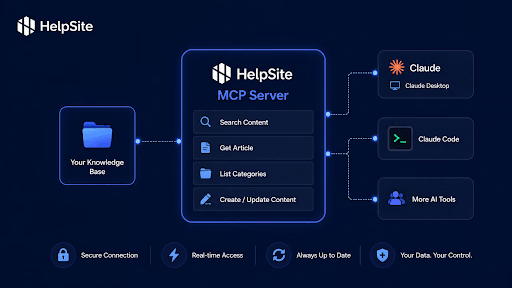
We are launching HelpSite MCP Server in the coming weeks. It lets you connect your HelpSite knowledge base directly to any MCP-compatible AI client, so AI tools can read, search, draft, update, and organize your HelpSite content through API-backed tools.
In practice, that means your team and the AI assistants you use can:
- Find articles by searching across your entire knowledge base
- Draft new articles and update existing ones
- Manage categories, tags, and overall site structure
- Read article metadata (categories, tags, dates) so AI tools understand context, not just raw content
- Respect your existing public versus internal article controls so private SOPs stay private
The practical outcome: a lot of the work that used to mean clicking around the HelpSite UI can now happen through your AI client of choice, while your help center stays the single source of truth.
Running on a custom domain means when AI assistants cite your docs through HelpSite MCP Server, they cite you, not a third party. For SaaS, IT, and fintech teams, that means the structural work pays off across every AI surface your stack touches.
If you want to be notified the moment HelpSite MCP Server is live, start your free HelpSite trial and you will be on the list.
Frequently asked questions
1. Should we worry about MCP and security?
It is a fair question. MCP is designed with authentication and access control in mind, and HelpSite MCP Server will respect your existing public versus internal article controls. Treat any MCP rollout the same way you would treat any other integration that exposes your knowledge base to third parties.
2. Can we control which articles are exposed through MCP?
Completely. You already tag articles as public or internal in HelpSite. MCP respects those boundaries. Public articles get exposed through MCP; private SOPs, confidential content, and deprecated features stay hidden. The tagging exercise your support team should do anyway is the same exercise that makes MCP rollout secure.
3. If we don't implement MCP, will our competitors have an advantage?
Potentially. MCP adoption is growing fastest in fintech, healthcare, and enterprise IT where integration standardization matters. If competitors offer MCP-connected knowledge bases and you do not, they land on procurement shortlists more easily. MCP amplifies what you have—great docs without MCP outperform poor docs with MCP. The competitive risk is waiting too long to prepare.
4. How is MCP different from the custom integrations we already have?
Custom integrations work, but they are brittle—every AI tool needs a new one. MCP replaces that fragmentation with a single standard. Think of it like moving from proprietary chargers to USB-C. One HelpSite MCP Server means ChatGPT, Claude, your in-product AI, and future tools can all connect the same way. No more one-off engineering work for each new tool.
5. Our team is split across support, product, and engineering. Who owns MCP readiness?
This is actually a feature, not a bug. MCP sits between docs and AI infrastructure, so support, content, and product all have a stake. The teams that win treat MCP readiness as a shared project. Support audits which articles should be public. Product thinks about how customers will interact with AI-powered docs. Engineering handles the server setup. It breaks down silos.
6. What does it actually mean that HelpSite is launching an MCP Server "soon"?
It means you will not need to build anything custom. You sign in, flip a switch in HelpSite, and your knowledge base is readable. No engineering work required. Your articles, metadata, and access controls come with it. The MCP Server acts as the bridge between your docs and whatever AI tools your team uses.
Final thoughts
The teams who win here are not the ones who wait for a finished spec. They are the ones who make their documentation structured, clean, and AI-ready now, so that when MCP shows up in their stack, the content already speaks the protocol's language. HelpSite MCP Server lands soon. Your docs can be ready before it does.