

Most SaaS help centers don’t fail because teams don’t care. They fail because content grows faster than the process behind it. Articles pile up, answers drift out of date, and customers bounce when search doesn’t surface what they need. Meanwhile, your team is under pressure to ship more content—often with AI writing prompts for SaaS content—without adding headcount.
In this post, we’ll break down examples of high-performing help centers and extract the patterns you can reuse. We’ll also show how modern teams blend AI content workflows with simple documentation systems so drafts turn into clear, searchable answers—not more noise.
What “high-performing” actually means for a help center
Before examples, align on outcomes. The best help centers consistently do three things:
- Deflect tickets with fast, relevant search.
- Scale content production without sacrificing clarity.
- Stay accurate as products change.
How to prioritize audit findings without overwhelming your team
A common failure mode after a knowledge base audit is enthusiasm overload. You uncover fifteen issues, everyone agrees they matter, and then… nothing ships. The fix is to rank findings by impact, not effort.
Use the “support impact × frequency” rule
For every gap you find, ask two simple questions:
- How often does this issue appear? (Daily, weekly, monthly?)
- How painful is it when it happens? (Minor confusion vs. ticket escalation or churn risk)
Items that score high on both get fixed first.
Example:
- Missing clarification in a billing article → high frequency, high pain
- Slightly outdated screenshot in an advanced feature → low frequency, low pain
The first gets fixed this week. The second goes on a backlog.
Example 1: Product-led SaaS help centers that lead with search
Many product-led companies design their help center around one thing: search first, navigation second.
What they do well
- Prominent search bar above the fold.
- Short, task-based article titles (“Reset your API key” vs. “API authentication overview”).
- Tight category depth (two levels max).
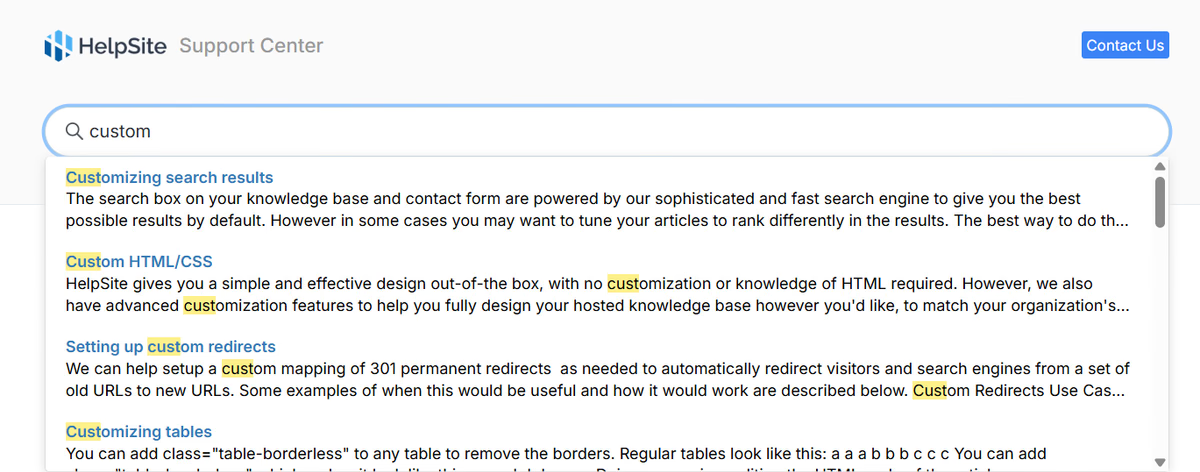
Why it works Fast search reduces cognitive load. Users don’t want to learn your taxonomy—they want answers.
Stat: Industry measurement frameworks (e.g., ServiceNow’s self-service research) emphasize that search effectiveness is foundational to self-service success because a knowledge base can’t support users if they can’t find the right content.
How to copy it
- Audit your top 20 searches and rewrite titles to match real queries.
- Use AI copywriting examples to generate alternative titles, then pick the clearest, not the cleverest.
- Keep categories shallow so search does the heavy lifting.
HelpSite is built around this pattern with relevance-ranked, “search-as-you-type” results that surface answers before users finish typing.
Example 2: Help centers that treat documentation like a product
High-performing teams don’t treat docs as a one-off task. They treat them like a shipped feature.
What they do well
- Clear article templates.
- Ownership per section (billing, onboarding, API, etc.).
- Regular reviews tied to product releases.
Why it works Consistency builds trust. Users can skim faster when every article follows the same structure.
How to copy it
- Start with a single article template (problem → steps → edge cases → related links).
- Use AI writing prompts for SaaS content to draft the first version, then standardize with human review.
- Schedule a quarterly "doc cleanup" sprint.
If you’re starting from scratch, using a lightweight knowledge base template avoids over-engineering early.
Example 3: Internal-first help centers that later go public
Some of the strongest public help centers start life as internal SOP wikis.
What they do well
- Write answers as if training a new hire.
- Capture edge cases and “why,” not just steps.
- Promote internal search adoption before customers ever see it.
Micro-case: One HelpSite customer reported a ~30% reduction in support cases after rolling out internal documentation company-wide.
Why it works Internal teams ask better questions than customers at first. That pressure improves clarity.
How to copy it
- Build your help center privately.
- Let support and success teams use it daily.
- Promote the most-used articles to public visibility.
This approach pairs well with simple tools that support public and private knowledge bases from one dashboard.
Example 4: Content-heavy SaaS companies using AI—carefully
AI shows up in high-performing help centers, but not as a magic button.
What they do well
- Use AI for drafts, outlines, and gap analysis.
- Keep final edits human.
- Optimize for clarity over keyword density.
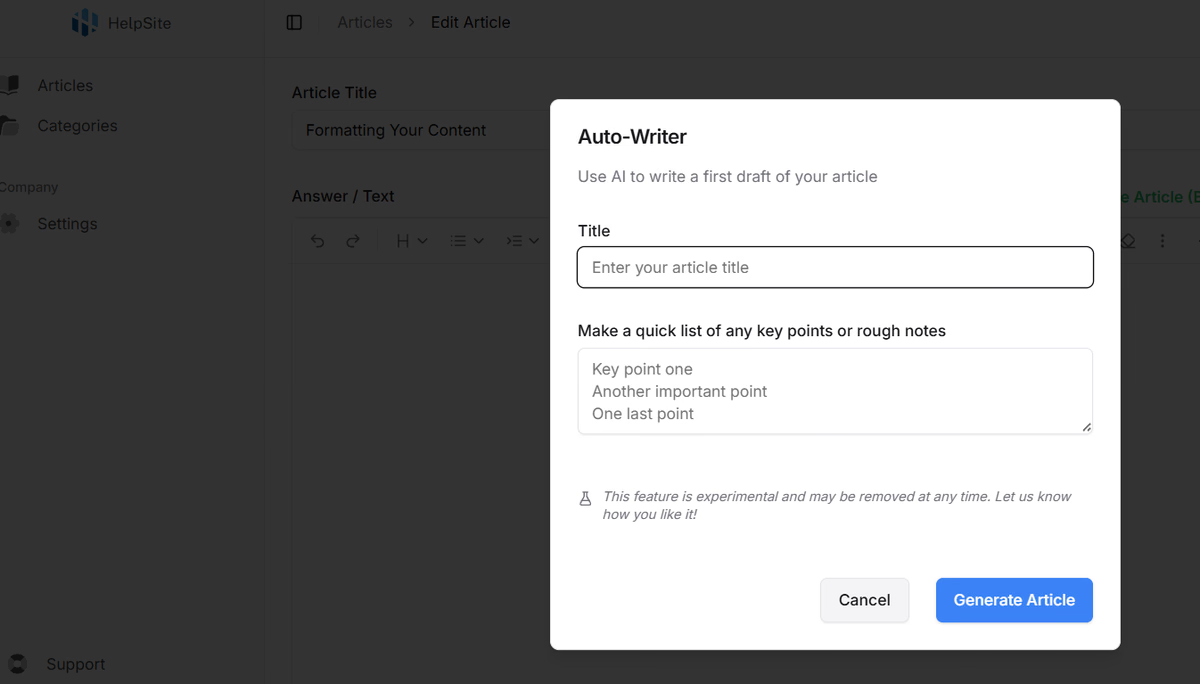
Why it works AI speeds up the boring parts. Humans keep answers accurate and empathetic.
How to copy it
- Build a simple AI content workflow: prompt → draft → human edit → publish.
- Store prompts alongside article templates for reuse.
- Avoid auto-publishing anything customer-facing.
Ready to turn audits into action?
If your knowledge base feels slightly out of date, a fast audit is only half the solution. You also need a tool that makes updates painless and keeps content searchable as you scale.
Example 5: Multi-product or multi-brand help centers done right
As soon as a SaaS company adds a second product, documentation complexity spikes.
What they do well
- Separate help centers per product or brand.
- Shared style and structure, separate content.
- Central management for admins.
Why it works Users never wonder if they’re reading the “wrong” docs.
How to copy it
- Split help centers by product early.
- Reuse templates, not articles.
- Choose tools that support multi-site setups without enterprise pricing.
Patterns you’ll see in every high-performing help center
Across all examples, a few patterns repeat:
- Simple IA beats clever IA.
- Search quality matters more than design polish.
- AI accelerates workflows—but doesn’t replace judgment.
- Docs are owned, reviewed, and iterated.
Turning examples into action (a quick checklist)
- Rewrite article titles based on real search queries.
- Introduce one standard article template.
- Add AI-assisted drafting with a human review step.
- Separate docs by product or audience.
- Review top articles quarterly.
Teams that follow this checklist tend to ship fewer but better articles—and see higher self-service adoption over time.
How audits improve onboarding, not just support
Most teams think of knowledge base audits as a support activity. In reality, they’re one of the most effective onboarding optimization tools you have.
Why onboarding benefits first
New users:
- Don’t know your terminology yet
- Don’t search the “right” keywords
- Follow documentation step-by-step
That makes them the most sensitive group to gaps, unclear instructions, and outdated flows.
What to audit specifically for onboarding
During your audit, flag:
- Articles that assume prior product knowledge
- Steps that skip setup prerequisites
- Links that jump users out of the onboarding flow
- Articles that start with “Once you’ve already…”
Each of these increases early friction.
Turning audit insights into long-term content improvements
The biggest hidden value of regular audits is not the fixes themselves — it’s the patterns you start to see.
Over time, audits reveal:
- Which features consistently confuse users
- Where product UX and documentation diverge
- Which terminology causes the most friction
- Which articles age fastest after releases
These patterns should influence more than just documentation.
Feed insights back into product and marketing
Strong SaaS teams use audit findings to:
- Improve in-product copy
- Refine onboarding tooltips
- Align marketing language with customer language
- Decide which features need better in-app guidance
Documentation is often the first place friction shows up — before churn metrics or NPS scores catch it.
Actionable tip:
Add one standing agenda item to your monthly product meeting: “Top three knowledge base gaps this month.”
This keeps documentation connected to real user behavior instead of becoming an afterthought.
Where HelpSite fits into this picture
High-performing help centers aren’t about flashy features. They’re about speed, clarity, and consistency. HelpSite is designed for teams that want an AI-friendly documentation platform—one where drafts become polished, searchable content without complex setup, per-agent fees, or bloated workflows.
If your goal is to scale content production responsibly—using AI where it helps and simplicity everywhere else—the right foundation matters.