

For years the choice was simple. Either your knowledge base was external — a public help center for customers — or internal — SOPs and playbooks for the team. Most companies picked one, half-built the other, and let the gap grow.
That model is breaking. AI assistants now read across both surfaces. Customers ask public AI tools about your product and get answers grounded in whatever content is public. Internal teams use AI copilots that need current, structured docs to be useful. Suddenly the split between internal and external is less a wall and more a set of access controls layered on top of a single, well-structured knowledge base.
This post walks through the decision. When to keep them separate, when to unify, and how the recent HelpSite releases (Themes, AI Chatbot, and MCP Server) make hybrid setups seamless in a way that was not possible a year ago.
When to keep internal and external separate
Two setups still work.
Regulated content. Compliance docs, internal audit playbooks, incident response runbooks, and anything covered by NDA belongs behind authentication. Not because you want it hidden from customers, but because you need a clear boundary for audit purposes. Our private knowledge base feature is designed for this.
Different audiences, different jobs. A customer troubleshooting a login issue and an internal ops team documenting a release process need different content and often different tone. Force them into one site and you serve neither well.
The mistake teams make is running these on two different platforms. That doubles the tooling cost, splits the analytics, and creates version drift the moment someone updates one and not the other.
When to unify (or move to a hybrid setup)
Unification is usually the right move when three signals appear together:
Content overlaps across audiences. Support agents reference the same articles customers read. Sales engineers cite public docs on customer calls. If your team is already working from your public help center, splitting content by audience is more theater than protection.
You want AI to work everywhere. As we covered in our knowledge base AI chatbots post, AI tools are only as good as the content they can read. A hybrid setup that lets AI see both internal SOPs (for staff) and public articles (for customers) is where the leverage compounds.
You want brand consistency across surfaces. If the internal wiki looks like a raw text dump and the customer help center looks like a marketing site, you have a trust problem inside your own team.
The hybrid future
This is where the recent product wave changes what is possible.
How MCP Server bridges internal docs to external AI agents.
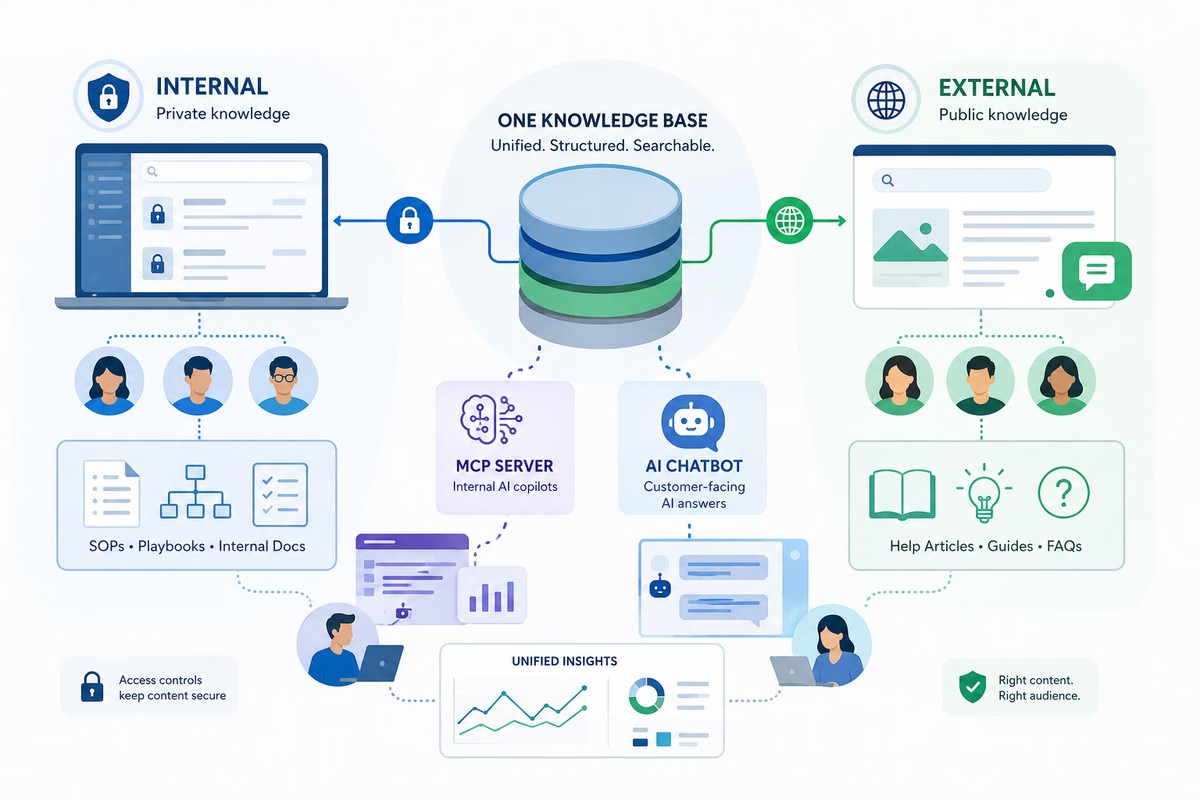
HelpSite MCP Server exposes your knowledge base to any MCP-compatible AI client (Claude Desktop, Claude Code, and more). Critically, it respects your existing public versus internal article distinction. Your internal SOPs stay private to authorized users while public articles are surfaced to external AI clients under whatever access scope you set. One knowledge base, layered access, AI that behaves accordingly on each side of the boundary.
AI Chatbot as the external face of your internal knowledge.
HelpSite AI Chatbot delivers source-backed answers to customers from your public articles. Because it draws only from published content, customer-facing answers stay bound to what should be public. The internal SOPs behind the wall stay behind the wall.
Meanwhile, Sourced AI Answers show the exact source article behind every AI response, so customers can verify the answer traces back to your real docs. This is the piece that makes AI-first support feel trustworthy rather than magical.
Unified branding via Themes across internal and external sites.
The new Themes feature lets each site — customer-facing, internal, per product, per brand — carry its own theme, logo, colors, and fonts. Your internal SOP site can be polished and searchable. Your customer help center can match your product exactly. Both sit inside one HelpSite account, so ownership, analytics, and updates flow through a single dashboard.
The self-service knowledge base has reduced ticket volume.
Armando M., Design Engineer, Civil Engineering
The decision framework
Six considerations to walk through before you commit to a setup. Score each row from 1 (leans internal-only) to 5 (leans external-only). Mostly 3s means you want a hybrid.
| Consideration | Internal-only | Hybrid | External-only |
|---|---|---|---|
| Audience overlap | Team-only content | Some content serves both | Customer-only content |
| Compliance load | Heavy regulated content | Some regulated, most not | Minimal regulation |
| Content velocity | Slow, stable updates | Mixed cadence | Fast, product-driven |
| Team size and structure | Small ops team | Growing multi-team | Support-led, external focus |
| Brand consistency needs | Low priority | Both surfaces must look polished | Customer brand is critical |
| AI extensibility (MCP and Chatbot support) | Internal AI copilots only | Both internal and customer AI | Customer-facing AI only |
The last row is new in 2026 and matters more than most teams realize. If you want AI tools working across both surfaces — internal copilots for staff, chatbot for customers, public AI grounding for prospects — you need a single knowledge base backend with access controls layered on top. That is what a hybrid setup gives you.
HelpSite as a unified solution
The recent HelpSite releases were designed exactly for this hybrid pattern.
One dashboard for multiple sites. Run customer-facing help centers and internal SOP sites from one account. Each site gets its own access rules, own theme, own analytics. You never manage two platforms.
Themes for polish across both surfaces. Each site can carry its own branding, so internal and external feel purpose-built without doubling design work.
AI Chatbot for customer-facing intelligence. Answers customers directly from your public help center, source-linked, with no risk of surfacing internal content.
MCP Server for internal AI copilots. Internal teams get AI clients that can read, search, draft, and update your live knowledge base under the access scope you define. Customer-facing AI reads only the public layer.
Analytics that spans both. Tracks search behavior and content performance across every site in your account, so you know which articles are pulling weight and where the gaps are, internal or external.
For SaaS, IT, and fintech teams thinking about how to serve both a growing internal team and increasingly AI-mediated external buyers, that combination is the fastest path to a knowledge system that scales in both directions.
Essential for providing a resource to our customers.
Kim P., Customer Success Manager, Biotech (2+ years)
Frequently asked questions
Should our public and internal knowledge bases share content?
Only the content that genuinely belongs on both. Onboarding guides, feature explainers, and integration setup usually belong on both. Compliance runbooks and internal SLAs stay internal. HelpSite's public versus internal distinction handles the boundary at the article level.
Can our AI chatbot accidentally leak internal content to customers?
Not when it is scoped correctly. HelpSite AI Chatbot only draws from published (public) articles. Internal SOPs remain invisible to it. The same access boundary that governs the help center governs the chatbot.
Can MCP-connected AI clients respect internal versus public content?
Yes. HelpSite MCP Server carries over your existing public versus internal article distinction. AI clients get access based on the scope you set. Internal-only articles are visible to authorized team members using AI copilots but never to external AI surfaces.
Do we need different themes for internal versus external sites?
You can, and most teams do. A customer-facing site should match your product brand. An internal site can be leaner and utility-first. Themes lets each site carry its own look while staying under one account.
How do we measure whether the hybrid setup is working?
Track deflection and search success on the external side, and time-to-first-answer on the internal side. Together they tell you whether your unified knowledge base is serving both audiences well.
Final thoughts
The internal-vs-external decision used to be a wall. In the AI era it is more like a set of access rules layered on top of one well-structured knowledge base. The teams that get this right build both surfaces on the same backend, brand each one appropriately with Themes, ground customer AI with the AI Chatbot, and extend internal AI with MCP Server.