

If you read our 5 workflows post, you know what HelpSite MCP Server can do. The workflows are compelling, but the practical question is simpler: how much time does your team actually get back?
This post breaks down the time cost of the old way versus the MCP-assisted way across support, product, ops, and content work. The numbers below are working estimates, not a promise. Use them as a baseline, then audit your own workflow to see what MCP could mean for your team.
What does documentation work cost before MCP?
Before MCP becomes part of the workflow, documentation work usually gets split across people who already have a full queue.
Support agent answers a knowledge gap
- Customer asks a question not covered in the docs yet
- Agent writes the answer in the ticket
- Someone needs to convert that answer into a published article
- That conversion happens later, if it happens at all
- The next customer asks the same question
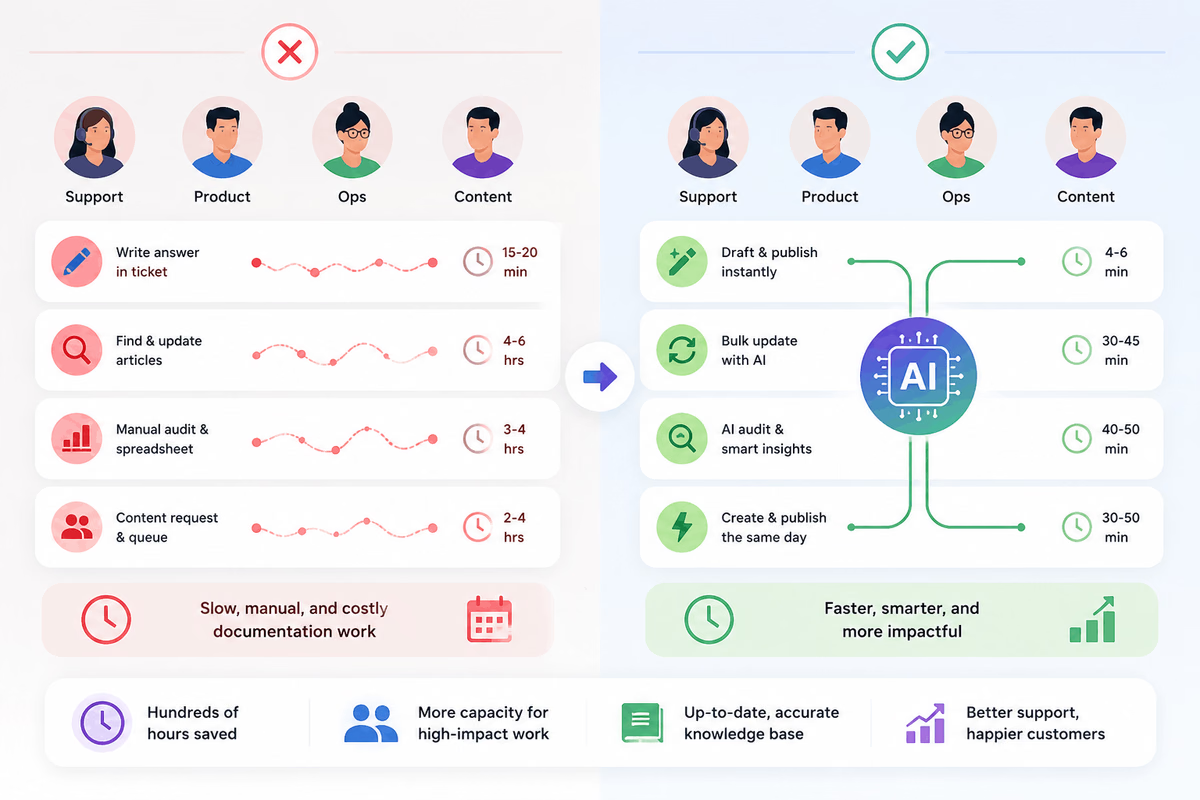
Baseline time cost: 15 to 20 minutes for the article that eventually gets written. The larger cost is the repeated customer emails that keep happening because the answer never became searchable.
Product team updates documentation after a release
- Product ships a rename, deprecation, or UI change
- A PM or support lead manually searches the help center for references
- Each article gets opened, edited, checked, and republished
- Screenshots may need refreshing
- Missed references surface later as support questions
Baseline time cost: 4 to 6 hours per release for a typical SaaS documentation update.
Ops or support manager audits knowledge base health
- Pulls up the help center
- Reviews article performance, update dates, and structure
- Builds a spreadsheet of stale content, duplicate topics, orphan articles, and gaps
- Shares findings with the team
- The next audit waits until someone has time again
Baseline time cost: 3 to 4 hours per audit. Many teams only do this annually, even when the KB changes every month.
Content team handles article requests
- Support flags an article that needs writing
- The request sits in a queue
- Content estimates scope and schedules writing time
- Draft goes back for review
- Revisions happen over several rounds
- The article finally publishes
Baseline time cost: 2 to 4 hours per article from request to publish, with queue time often measured in weeks.
How does MCP save time in the same workflows?
HelpSite MCP Server gives an MCP-compatible AI client a structured way to work with your HelpSite knowledge base. That means the AI can search articles, draft content, suggest updates, and help inspect structure while your team still reviews the work.
Support drafts a new article from the ticket
- Customer asks a question not in the docs
- Agent asks Claude to draft a HelpSite article on the topic
- Claude uses the existing knowledge base context and creates a draft
- Agent reviews the draft, edits the parts that need human judgment, and publishes
Estimated time saved per article: 55% to 70%, from 15 to 20 minutes down to about 4 to 6 minutes for a simple article.
Product bulk-updates docs after a release
- Product change ships
- PM asks Claude to find every article mentioning the old term
- Claude searches HelpSite and surfaces the matches
- PM reviews the proposed updates for accuracy
- Approved articles get updated and republished
Estimated time saved per release: 85% to 90%, from 4 to 6 hours down to about 30 to 45 minutes for a focused terminology or instruction update.
Ops audits the knowledge base more often
- Manager asks Claude to review the help center for stale articles, duplicate topics, and missing categories
- Claude returns a structured list
- Manager decides what to archive, rewrite, assign, or leave alone
- Follow-up work gets distributed to the team
Estimated time saved per audit: about 80%, from 3 to 4 hours down to 40 to 50 minutes. The bigger win is that audits can happen quarterly instead of annually.
Content handles requests without the long queue
- Support flags an article need
- Content works with Claude to draft directly from HelpSite context
- Revision happens in the same session
- Article goes live after human review instead of waiting behind the full content backlog
Estimated time saved per article: 60% to 75%, from 2 to 4 hours down to about 30 to 50 minutes for a first useful draft.
What compounds after the first year?
The first-year numbers are direct time savings. The second-order effect is more interesting: the knowledge base starts getting maintained because the work is no longer so expensive to begin.
Support publishes more answers while the question is still fresh. New hires onboard against more complete documentation. Product updates docs closer to the release date, so the help center stops lagging behind the product. Ops audits before small issues turn into a cleanup project.
Content also gets breathing room. Instead of only reacting to requests, someone can improve article structure, rewrite confusing titles, and fix the places where customers search but do not find the right answer.
That is the real value of MCP: not just faster tasks, but a knowledge base that keeps getting more useful because maintenance finally fits into the week.
Why should small teams measure MCP time savings?
If you are on a small team, these hours are the difference between "someone owns docs as a side job" and "someone actually maintains them."
If you are on a larger support or product team, these hours are the difference between a documentation bottleneck and a repeatable documentation workflow.
Both matter because the work is already happening. It is just happening slowly, manually, and usually after the customer has already asked the question.
Two HelpSite customers describe the broader point well:
The analytics have been a game-changer for us. We can now see exactly which articles are helping our users and which ones need revision or removal. It's eliminated the guesswork from content strategy.
Sarah P., Customer Success Manager, SaaS Startup
What an amazing platform. It has helped me a lot. I created it for my organization and my seniors, and everyone is so happy after seeing this amazing tool. One stop solution for any organization.
Vivek K., Immigration Consultants, International Trade and Development
How should you audit your current baseline?
The easiest way to validate the math is to measure your current workflow before MCP changes it.
For support:
- Count articles drafted in the last 90 days
- Measure the average time from "ticket flagged for documentation" to "article published"
- Count how many repeated questions still never became articles
For product:
- Look back at your last 3 releases
- Tally the hours spent on documentation updates
- Note which updates were missed and later became support questions
For ops:
- Check when your last knowledge base audit happened
- Record how long it took
- List what stayed on the backlog because the audit ran out of time
For content:
- Track articles requested in the last month
- Measure days from request to publish
- Count requests still waiting in the queue
Once you have those numbers, apply the ranges above. Your exact savings may be higher or lower, but you will know where MCP has the best chance to buy back real time.
Frequently asked questions
Are these MCP time savings guaranteed?
No. They are working estimates based on common documentation workflows, not guaranteed results. The best way to estimate your own savings is to measure current article creation, update, audit, and request workflows before adopting MCP-assisted processes.
What if my team already uses AI tools?
MCP still matters because it connects AI tools to your live HelpSite knowledge base. Generic AI can help draft text, but MCP gives the AI client structured access to your articles, categories, and current HelpSite content.
Does HelpSite MCP Server publish changes automatically?
MCP can help draft and prepare updates, but your team should still review important changes before publishing. The strongest workflow is AI-assisted work with human review, especially for policy, pricing, account, or product instructions.
Where can I see whether MCP Server is included in my plan?
Check the current HelpSite pricing page for plan details. The workflow math in this post still helps you identify where AI-connected documentation could save time before you compare feature availability.
The bottom line
MCP Server is not a feature you add and forget. It is a way to put your team's attention back where it compounds: writing the answer once, keeping it current, and making it easy for customers, teammates, and AI tools to find.
Ready to see what it means for your team? Start a free HelpSite trial and connect your knowledge base to AI workflows.