

A well-maintained help center runs on clear ownership. Every article has a person attached to it who knows when something is expected of them and can close the loop when it is done.
Most teams do not have the infrastructure to act on that. Ownership lives in a Slack thread until the thread is buried, in a spreadsheet until the spreadsheet goes stale, or in a manager's memory until that person leaves. The result is a help center that drifts slowly out of date while the people who could fix it have no clear signal that anything is wrong.
HelpSite Assignments changes what infrastructure is available. This post explains what article ownership looks like in practice and what teams get when every piece of documentation work has a named person, a status, and a notification.
What does it mean to give an article an owner?
Ownership in a knowledge base context means accountability for specific work: someone responsible for writing a new article, updating an existing one, or reviewing something before it goes live. It is time-bounded and task-specific — a request with a named person, a deadline, and a clear outcome.
The Consortium for Service Innovation, which created the Knowledge-Centered Service (KCS) method, builds it on the same idea: knowledge gets captured and updated as part of the work, not saved for a separate cleanup project. Ownership is how that happens in practice. When a person knows a specific article is their responsibility right now, that article gets addressed. When no one knows, it waits.
HelpSite Assignments makes three types of work explicit.
Write. Send a request to a teammate to create a new article from scratch. Add context, attach a due date, and it appears in their queue with everything they need to get started.
Update. Link an existing article and ask a teammate to make specific changes. They see the article and what needs fixing without a back-and-forth conversation to find it.
Review. Ask a teammate to check an article before or after publication. The open review shows in the editor, so the reviewer knows what to look for and can mark it done from there.
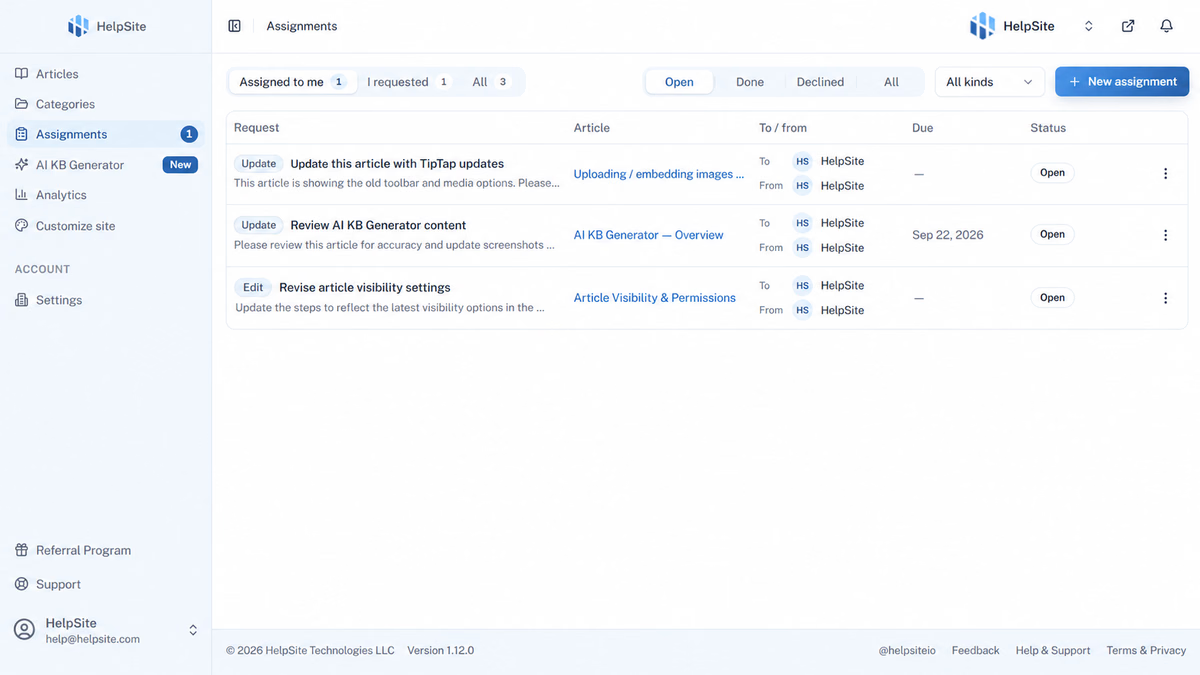
Each assignment has a status: Open, Done, or Declined. Both the assignee and the requester can see where things stand at any point from the Assignments page.
How do notifications and accountability work?
The practical breakdown of documentation ownership is almost always the same: someone says they will update an article, the conversation ends, and without any follow-up mechanism the work does not happen on a predictable timeline. The root cause is simple: unassigned work has no deadline and no reminder, so it competes with everything urgent and loses.
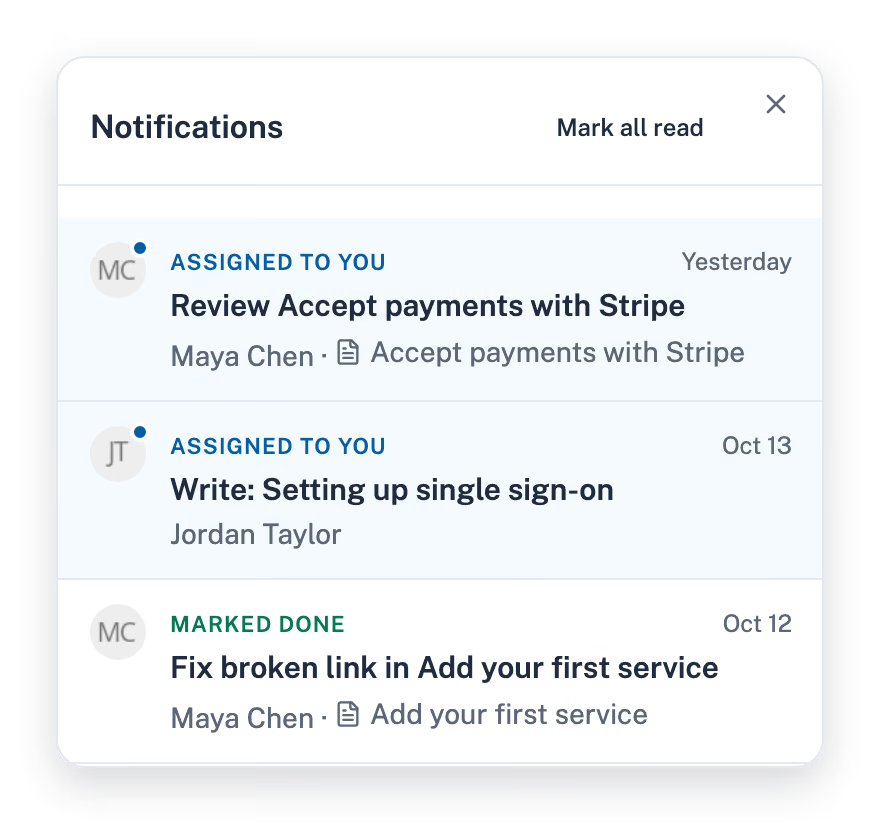
HelpSite Assignments closes that loop in two directions. When an article request is sent, the assignee receives both an in-app notification and an email with the full context: what is needed, the due date, and a direct link to the article in the editor. When the assignee marks the work done, the requester gets an email confirming it is complete. No one has to chase anyone. The system does the chasing.
A few details worth knowing: assignments can be reopened after they are closed, declined assignments stay visible so the requester knows the work did not happen, and assigning something to yourself does not trigger a notification. Due dates are optional but visible to both parties for the full lifecycle of the request.
Because HelpSite keeps a full version history with author attribution on every article, completed assignments leave a clear record of who did what and when. The accountability loop closes in both directions.
What does this look like for a team running quarterly reviews?
A content manager at a mid-sized SaaS company with 40 help center articles might run a quarterly review by doing the following.
They open Analytics to see which articles get the most views, which searches visitors run without clicking a result, and which articles the AI Chatbot cited in answers that visitors rated not helpful. Those are the update candidates. From the Assignments page, they create Update requests for the five highest-priority articles and assign each to the subject matter expert who owns that product area.
Each assignee gets an email with a link to their specific article and a two-week due date. The requester sees Open status for each one. Over the next two weeks, assignees mark their articles done. The requester receives email confirmations and can verify the changes through version history. Five articles are refreshed without a single Slack thread, status meeting, or follow-up message.
The same pattern works for new features. When something ships, the team lead sends Write or Update assignments to the relevant people. No one decides later that it was someone else's job.
Can Claude take article assignments?
If your team connects HelpSite to Claude via the MCP Server, Claude can be assigned article work alongside human teammates. Claude can list its open assignments, write new articles as drafts or update existing ones, and mark assignments done with a note on what changed.
When Claude finishes a Write or Update assignment, it can hand the work back as a Review assignment for the requester, so a person checks it before anything is published. New articles Claude writes start as drafts. The human review step stays in the process.
This is useful for teams that want to move faster on first drafts without removing the editorial pass. Claude handles the blank-page work; your team handles accuracy review.
What to do this week based on your role
Support lead: Open HelpSite Analytics, find the three most-viewed articles that visitors rated not helpful or that match searches nobody clicked, and send Update assignments to the people who own those product areas. Set a two-week due date. Check the Assignments page in two weeks.
CS manager: Ask your team which five questions they answered most often last month that do not have a clear help center article. Create Write assignments for each one. Due dates keep them from competing with higher-urgency work.
Content manager running a review: Use the Assignments page instead of a spreadsheet. One place for every open request, with statuses your whole team can see.
Team lead onboarding someone new: Send a Review assignment on your three most important onboarding articles. New hires reviewing articles is a good way to learn the product and a good way to catch stale instructions before they confuse customers.
"I like how it makes it super easy and friendly, so different users in the company can collaborate without having to know website publishing." — Daniel H., Chief Executive Officer
Frequently asked questions
What types of article assignments can I create in HelpSite?
Three: Write (create a new article), Update (change an existing one), and Review (check an article and sign off on it). Each type tells the assignee exactly what you are asking for so there is no ambiguity about the expected work.
How does someone know when they have been assigned an article?
Assignees receive both an in-app notification and an email with the article link, the due date, and any context the requester added. Requesters get an email when the assignment is marked done. Neither side has to check in manually to know where things stand.
Does HelpSite keep track of who made changes to an article?
Yes. HelpSite autosaves articles and keeps a full version history with author attribution, so you can see who made which changes and restore any previous version if needed.
Is Assignments available on all HelpSite plans?
Assignments is included on the Max plan. See HelpSite pricing for what each plan includes.
Can I assign article work to an AI?
Yes, if your team has connected HelpSite to Claude via the MCP Server. Claude can receive assignments, do the article work, and hand it back to the requester as a Review assignment. Articles Claude writes start as drafts.
Final thoughts
Clear ownership is the difference between a help center that drifts and one that stays useful. Assign the work to a named person, set a due date, and the system surfaces problems and closes loops that would otherwise fall through. Start with the three articles your analytics show as the highest-traffic and lowest-performing — those are the ones your customers are hitting right now.
Ready to give every article a clear owner? Start your free HelpSite trial and explore Assignments alongside the full AI Chatbot and Analytics suite.