

Agencies are quietly one of the best-fit users of a modern knowledge base platform. Every client account needs a home for their onboarding docs, campaign playbooks, brand guidelines, and shared resources. Every one of those homes needs to feel like the client's product, not like a generic third-party portal. And the agency needs to manage all of it without hiring a developer for each new engagement.
The recent HelpSite Themes release closes the last gap that used to make this hard. Combined with Multiple Sites and custom domain support, agencies can now run a polished, distinctly branded client portal per account, all from one HelpSite dashboard.
This is the playbook.
Why do agencies need multi-brand knowledge base infrastructure?
Three realities push agencies toward this setup, whether the agency does creative, digital, marketing, or consulting work.
Clients expect a professional home for shared work. Documents in Google Drive, links in Slack, and screenshots buried in email are not what a client thinks of when they consider whether you are "buttoned up." A branded client portal reframes the whole engagement.
Reinventing the wheel for every client is expensive. Every hour spent setting up a new portal from scratch is an hour not billable to strategy or delivery. The right platform makes new-client setup a same-day operation.
Branding matters more than agencies often admit. A portal that looks like your agency's tool (not the client's) undermines the "we work as an extension of your team" pitch. A portal that looks like the client's own product reinforces it.
The three pain points of running client portals badly
Most agencies have hit one or all of these at some point:
Scattered docs across five tools per client. Google Drive, Notion, Slack, Loom, and email each hold pieces of the client's playbook. Nobody — agency or client — can find what they need.
"Where is the thing you sent me?" The most expensive question in agency-client relationships. Every occurrence is a follow-up email, a lost minute, a small trust deposit spent.
Rebuilding the portal for every client. No template. No standard. Every new engagement starts from scratch and ends in a different shape.
The Multiple Sites and Themes playbook
The setup that solves all three:
Step 1: One HelpSite account, one site per client. Under Multiple Sites, each client gets a dedicated portal. Access controls, analytics, and content live per client without duplicating the platform.
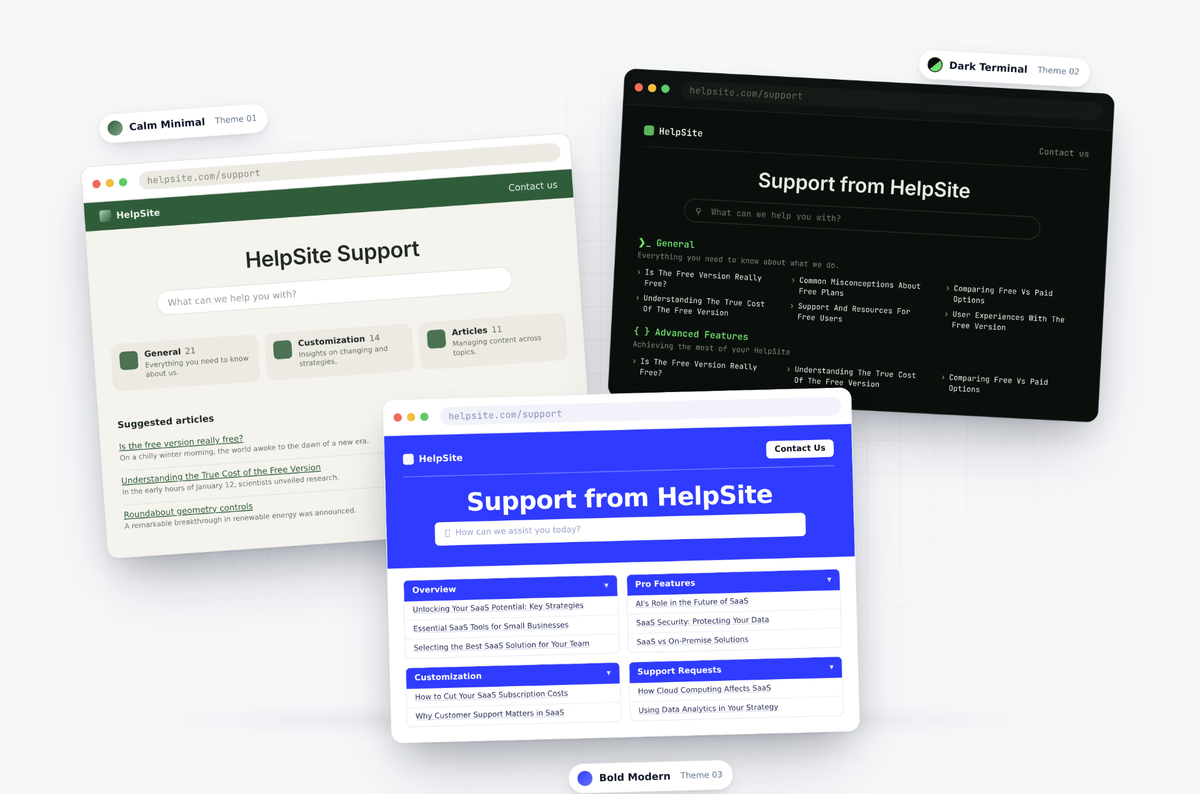
Step 2: Themed per client. Each portal carries its own theme with the client's logo, colors, and fonts. Start from one of the ready-made themes (Calm Minimal, Dark Terminal, Bold Modern, or Ready Layout) and customize colors and fonts in the visual editor. Deeper customization is available through HTML and CSS on Gold and Plus plans.
Step 3: Custom domain per client. Host each portal at help.clientname.com through custom domain and SSL support. The client sees their own brand at their own URL. You never appear in the address bar.
Step 4: A shared template you clone per new client. Build a base portal template once — categories, standard articles, welcome page structure — and clone it for every new client. New engagements go live in a day, not a week.
I have now created 7 HelpSites. The ease and intuitiveness of building a content-rich site is not obvious until you dig in and start creating. When the president of our company went to test it out at a company meeting he queried one of the more unusual support call questions we received, and in seconds he had the answer.
Bradley U., Chief Content Creator, Marketing and Advertising
Adding AI Chatbot per client
The optional layer that separates a good agency portal from a great one.
Each client portal can carry its own AI Chatbot that answers questions grounded in that client's articles. The client account team gets faster answers to common questions. End clients get a self-serve layer that feels premium.
Because HelpSite AI Chatbot uses Sourced AI Answers, every AI response links back to the specific article behind it. Clients trust the answers because they can verify the source. The agency avoids the "AI said something weird" support tickets that plague generic chatbot deployments.
What does a great agency-run client portal include?
The standard content set that works across most agency-client relationships:
- Welcome and orientation. How this portal is organized, who to contact, meeting cadence.
- Onboarding docs. Kickoff summary, brand guidelines, asset library, tooling access.
- Live campaigns or projects. Current status, next milestones, decision log.
- Playbooks. Repeatable processes the client can reference between meetings.
- Deliverable archive. Approved work, timestamped, easy to reference in future scopes.
- Meeting notes and decisions. Searchable history so no decision gets lost.
- FAQ. The questions the client keeps asking, answered once.
The last item is where AI Chatbot pays back fastest. Every question a client asks that already has an answer in the portal deflects a Slack message or a follow-up email.
The look of the knowledge base out of the box is surprisingly good.
Andrew M., Digital Marketer, E-Learning
How do you price and package this as an agency service?
Three common packaging models for agencies:
Baked into the retainer. The portal is a standard deliverable on every engagement, funded from the ongoing retainer. No separate line item. Positioning: "we work in a shared workspace that becomes your permanent knowledge base."
Line-item setup fee plus monthly. A one-time portal setup fee ($1,500 to $5,000 depending on customization depth) plus a monthly maintenance fee that covers content updates, analytics reviews, and AI chatbot tuning.
White-label reseller. For agencies with larger client rosters, resell HelpSite under your own brand as part of a productized "always-on client portal" offering. The margin is real once you get past three or four clients on the setup.
Whichever model, the maintenance work compounds. Every client portal you run makes it easier to launch the next one, because your base template gets sharper and your standard content set gets better.
How HelpSite supports agencies specifically
The agency use case page covers the specifics, but the short version: one dashboard for every client, distinct branding per portal, custom domains as a standard feature, AI Chatbot per site, and shared Analytics across your book of business so you know which portals are getting used and where.
Frequently asked questions
How many client portals can we run under one HelpSite account?
Multiple sites are supported at scale. Check the pricing page for the current per-site limits by plan. Agencies typically start on a plan that supports at least five sites and expand as the roster grows.
Can each client's portal be completely off our agency brand?
Yes. That is the point. Each portal carries its own theme, logo, colors, fonts, and custom domain. Nothing about the platform signals "this is a HelpSite" or "this is our agency's tool." Your client sees their own brand.
What happens when a client offboards?
You can transfer the portal to the client's own HelpSite account or archive the content. Either way, the branded work you produced is preserved rather than disappearing into a shared Drive folder.
Can we let clients edit their own portal content?
Yes. Grant client-side editors access to their portal without giving them access to your other client accounts. The permissions layer keeps everything separated.
How long does a new client portal take to launch?
If you start from a template, an afternoon. Colors, logo, custom domain, and a base content set can be in place same-day. From there, content builds over the first week of the engagement.
Final thoughts
The agencies pulling ahead are the ones treating client documentation as a productized service, not an afterthought. A branded, per-client portal is the visible artifact of that shift. It signals professionalism to prospects, reduces the "where is the thing you sent me" tax, and turns your accumulated deliverables into an asset the client actually references between meetings.
Set up your first branded client portal this week. Clone it for every new engagement going forward.